
How to Make a Meme From a Picture Free (Tested Tips)
To make a meme from a picture, open the free Meme Generator, drop in the picture, type the top and bottom text and download it. The classic bold white lettering with a black outline is applied for you, long lines wrap automatically, and nothing is uploaded or watermarked. Below are real results from our tests: how big to make the text, why long captions collide, which format to save, and what the tool will not do.
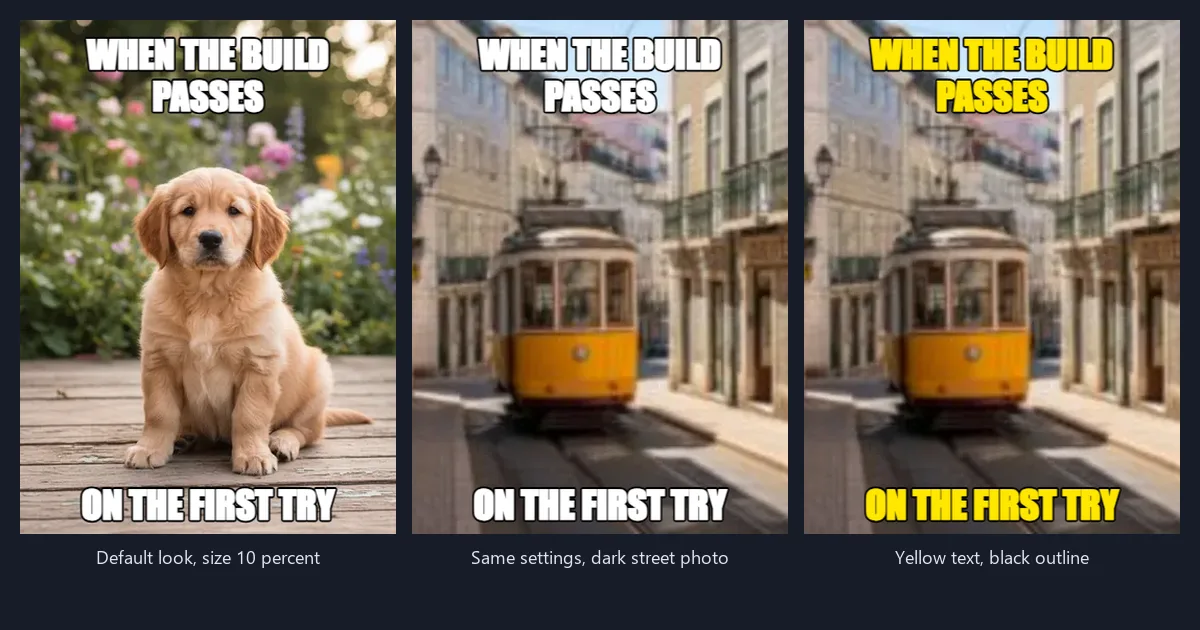
The short answer
- Tool: Meme Generator. Free, no account, no watermark, runs on a phone or computer.
- Controls: top text, bottom text, size 4 to 22 percent of the picture width (default 10), margin 0 to 15 percent, text color, outline color, force capitals, and PNG, JPG or WebP output.
- Length matters more than anything: a 59-character caption needs size 6 or less on a 360 pixel wide photo.
- Wide, short pictures are where two long captions collide.
- Not the right tool for text placed anywhere, several text boxes or other fonts: use Add Text to Image.
How do you make a meme from a picture in five steps?
- Open the Meme Generator in any current browser.
- Drop in a picture, or tap to choose one. A preview with sample text appears at once and updates as you type.
- Type the Top text and the Bottom text. Either can be left empty for a one-line meme.
- Adjust the Text size until the lines sit comfortably, and change the Margin, the Text color, the Outline color or Force capitals if you want a different look.
- Choose PNG, JPG or WebP and download. The result keeps the pixel size of your original.
Everything happens in your browser, so a private photo or a chat screenshot is never uploaded.
How big should meme text be?
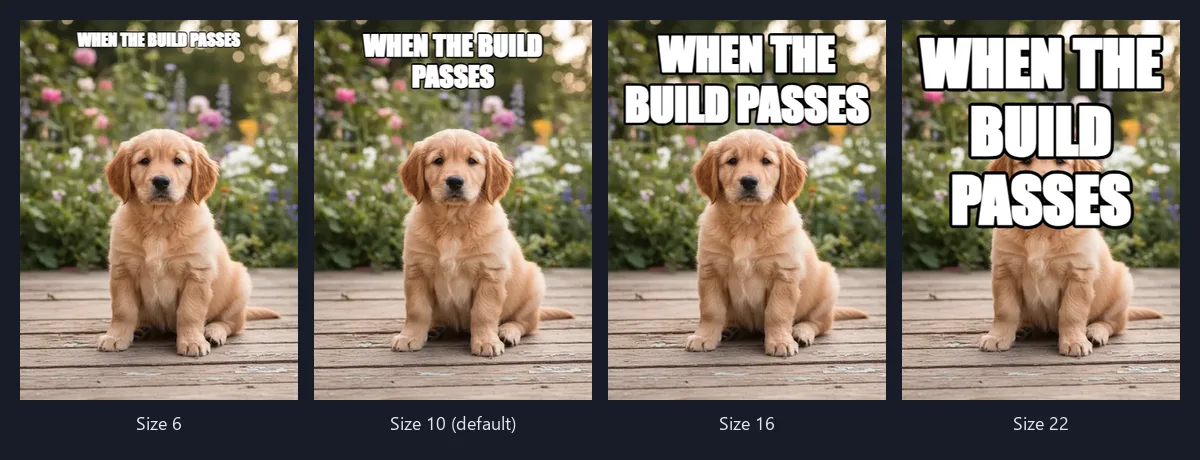
The Text size slider is a share of the picture’s width, not a pixel size, so the same setting looks the same on a thumbnail and a 4,000 pixel photo. We checked on the site’s puppy photo, 360 pixels wide, and again after enlarging it to 1,080 pixels: the layout was identical, two lines at the top and one at the bottom, just three times the pixels. The outline scales with the text.
| Text size | “WHEN THE BUILD PASSES” on a 360 pixel wide photo | Good for |
|---|---|---|
| 6 percent | One line, 59.7 percent of the width | Long, wordy captions |
| 10 percent (default) | Two lines, 66.1 percent wide | Short punchlines of two to four words per line |
| 16 percent | Two big lines, 89.7 percent wide | One or two shouted words |
| 22 percent | Three lines, 89.7 percent wide | A single word; anything longer fills the picture |
The rule of thumb that falls out: the more words, the smaller the size. Aim for text you can still read when the meme is shown at the size of a phone thumbnail, and keep the lines off the subject’s face. If you will post it somewhere with a fixed shape, pick the picture shape first; the social media image sizes guide lists them.
What happens with a long caption?
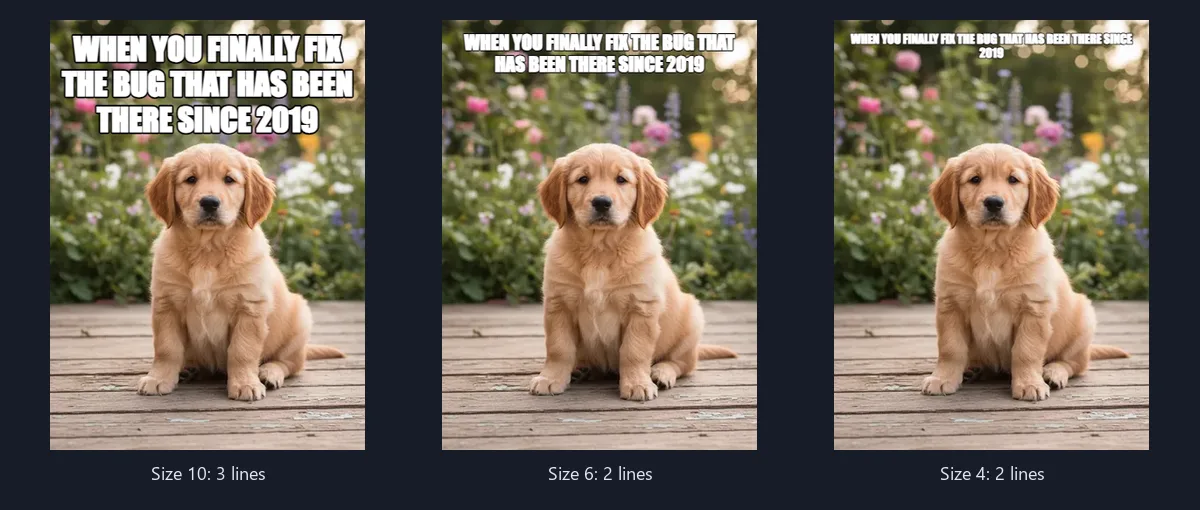
The text wraps at spaces, using the width minus a margin on each side. Top text grows downward from the top margin and bottom text grows upward from the bottom margin. We typed a 59-character caption and changed only the size:
| Size | Lines | Result |
|---|---|---|
| 10 percent | 3 | Reaches down to about a quarter of the way into the photo and covers the puppy’s ears |
| 6 percent | 2 | Stays in the top strip |
| 4 percent | 2 | Smaller but no shorter, because the text was already two lines |
So going from 6 to 4 percent bought nothing here. Cut words instead: the best memes are short. One thing wrapping cannot do is split a word. A single 34-letter word at size 10 was not wrapped and was cut off at both edges, so lower the size until it fits.
Why do the top and bottom captions collide on a wide picture?
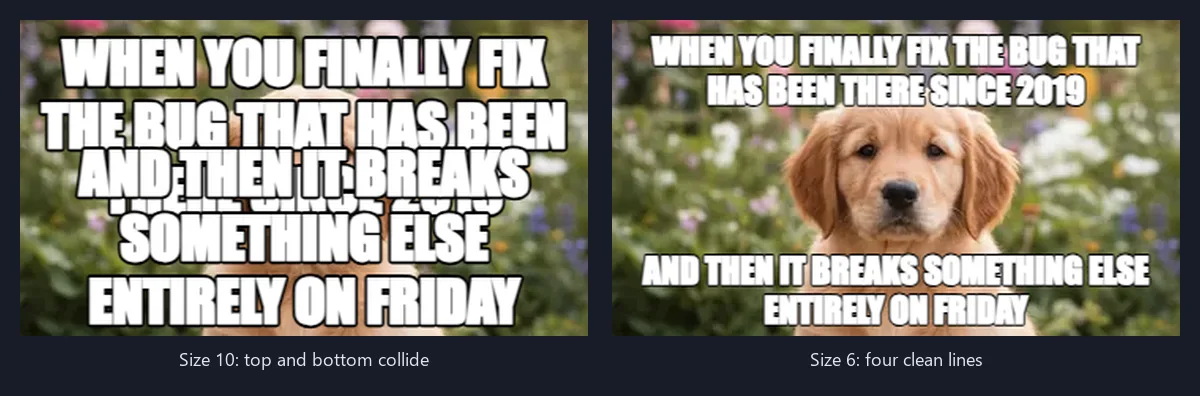
The two captions do not know about each other. On a tall photo there is room for both; on a short, wide one two long captions can meet in the middle. On our 360 by 200 pixel test photo a 59-character top caption and a 49-character bottom caption took three lines each at size 10 and overlapped, covering the puppy. At size 6 they took two lines each and left the middle clear. If the preview shows lines touching, lower the size, shorten one caption, move the joke to one caption only, or use a taller crop (the Image Cropper will do it first).
What is the classic meme look, and can you change it?
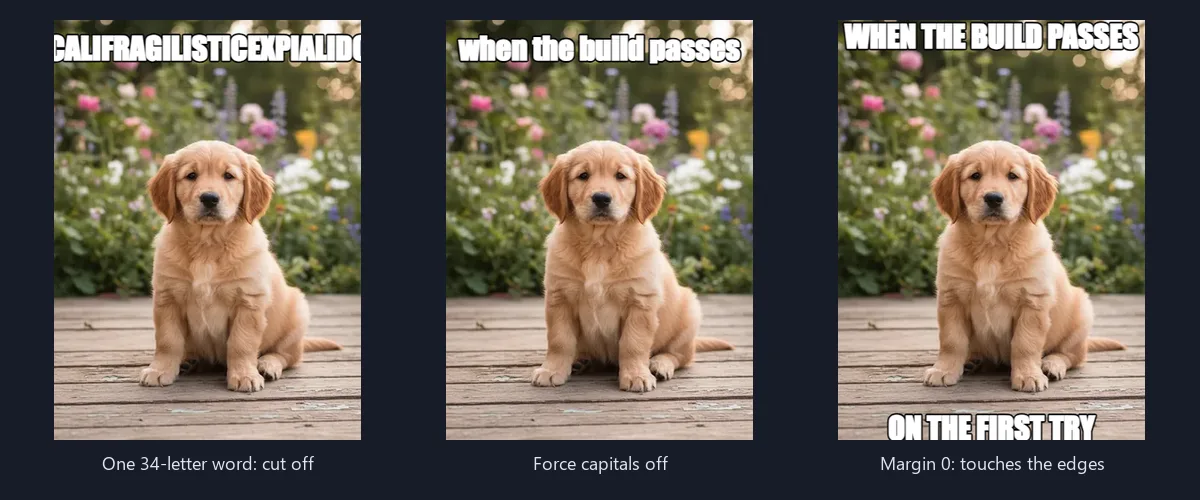
The look is Impact, bold, in capitals, white with a heavy black outline. Wikipedia says Geoffrey Lee designed Impact in 1965, that it has shipped with Windows since Windows 98 and appears among the macOS typefaces, and that it became the standard of image macros. The tool asks your device for Impact and falls back to a similar heavy condensed font if it is missing, so a phone without Impact may show slightly different letters; check the preview. We tested on Windows only.
- Force capitals is on by default. Turn it off for a quieter, lowercase caption, which in our test fitted on one line at size 10 (93.6 percent of the width).
- Text color and Outline color are free pickers. The white-on-black pair is readable on almost anything because the outline guarantees contrast; yellow with a black outline worked equally well on the dark street photo. If you pick pale text, keep the outline dark.
- Margin is a share of the shorter side of the picture (default 4 percent). At 0 the text sits against the top and bottom edges, which looks cramped and may be cropped by an app; at 15 percent on our photo the top text started 56 pixels down. Keep the default unless the picture will be cropped.
How do you write a caption that works?
This part is not the tool’s job, but it decides whether anyone reads the meme. Four habits help:
- Split the setup and the punchline across the top and the bottom: the setup on top, the twist below.
- Use fewer than ten words per line. Every extra word forces a smaller size.
- Pick a picture with calm areas at the top and bottom, such as sky, wall or floor, so the lettering does not hide the subject.
- Check the preview at thumbnail size. If you cannot read it at a glance, raise the size or cut words.
For text anywhere other than the top and bottom, in other fonts or in several places, use Add Text to Image; see how to add text to a picture for its tests.
Which format should you save a meme as?
The same 360 by 492 pixel meme came out at three sizes:
| Format | File size | Use it when |
|---|---|---|
| JPG (default) | 55,593 bytes | Posting to chats and social networks |
| WebP | 32,938 bytes | The place you post it accepts WebP and you want the smallest file |
| PNG | 344,051 bytes | You will edit it again, or the picture has flat colors |
Memes get re-saved and re-shared, and each lossy save softens the outline a little, so keep the original and share one copy. To shrink a file for a size limit use the Image Compressor, and read about image formats for the differences. To animate a meme, see the GIF Maker.
Can you use any picture for a meme?
Pictures you took yourself are the safe choice. For other people’s pictures the U.S. Copyright Office explains that fair use is decided case by case on four factors: the purpose and character of the use (including whether it adds something new), the nature of the work, the amount used, and the effect on the market for the original (copyright.gov/fair-use). Its page states that there is no formula giving a set amount of a work that can be used without permission. A joke meme shared with friends is a very different case from a meme used to sell something. This is general information, not legal advice, and other countries have different rules. Pictures of people deserve extra care: do not make a meme that mocks a private person.
Which tool should you use?
| You want | Use |
|---|---|
| Classic top and bottom meme text in seconds, nothing uploaded | Meme Generator |
| A caption, quote or title in a font of your choice, placed anywhere | Add Text to Image |
| A repeated mark across the picture to protect it | Watermark Tool |
| Many text boxes, templates or stickers | A layout editor such as Canva or Kapwing |
The online meme makers that came up in our search (Imgflip, Clideo, Kapwing, Canva, Adobe Express and others) follow the same upload, type, download flow. The difference here is that the picture stays on your device and there is no account or watermark; if you need templates or several text boxes, those editors offer more. We did not test them.
Troubleshooting
| What you see | Cause | Fix |
|---|---|---|
| The text covers the subject | Size too big or caption too long | Lower the size, shorten the words, or crop the picture taller |
| Top and bottom lines overlap | Two long captions on a short picture | Lower the size, or use one caption only |
| A word is cut off at the edges | One word wider than the picture | Lower the size until it fits |
| The letters look different on my phone | Impact is not installed, so a fallback font is used | Check the preview, or make the meme on a computer |
| The text touches the edge | Margin is 0 | Raise the Margin to 4 or more |
| The text is lowercase | Force capitals is off | Tick Force capitals |
| The text is hard to read | Pale text with a pale outline | Use a dark Outline color |
| The file is too big to send | PNG chosen | Save as JPG or WebP |
Questions
How do I make a meme from my own picture for free?
Open the free Meme Generator, drop in your picture, type the top and bottom text and download the result. The classic white lettering with a black outline is applied automatically. It runs in your browser, the picture is never uploaded, and there is no sign-up or watermark.
What font do memes use?
Classic image memes use Impact in white capitals with a black outline. Geoffrey Lee designed Impact in 1965, and according to Wikipedia it has shipped with Windows since Windows 98 and is on macOS. The ImgVX tool asks your device for Impact and falls back to a similar heavy font where it is missing. More help: ImgVX AI help docs.
How big should meme text be?
Short captions read best at 10 percent of the picture width, which is the default. A longer sentence needs 4 to 6 percent. In our test a 59-character caption took three lines at 10 percent on a 360 pixel wide photo and two lines at 6 percent. Browse: all free image tools.
Why does my meme text run over the picture or collide?
The caption wraps onto as many lines as it needs, so a long caption on a short, wide picture can run into the caption at the other end. Lower the Text size slider, shorten the words, or use a taller picture. At size 10 two long captions overlapped on our 360 by 200 pixel test photo; at size 6 they did not. More help: ImgVX AI help docs.
Does the meme generator wrap long text?
Yes, at spaces. A single very long word cannot wrap: our 34-letter test word was cut off at both edges at size 10. Lower the size until it fits or split the word. More help: ImgVX AI help docs.
Can I use any picture to make a meme?
Technically yes, legally it depends. The U.S. Copyright Office says fair use weighs four factors: the purpose of the use, the nature of the work, how much is used and the effect on the market. It also says there is no formula that makes a set amount automatically free. Photos you took yourself are the safe choice. This is general information, not legal advice. More help: ImgVX AI help docs.
Which format should I save a meme in?
JPG for sharing, which is the default. Our 360 by 492 pixel meme was 55,593 bytes as JPG, 32,938 as WebP and 344,051 as PNG. Pick PNG only when you will edit the picture again, because text edges stay sharpest in a lossless file.
Is it safe to make a meme from a private photo?
Yes. The ImgVX AI Meme Generator draws the text on your device and never uploads the picture, so a family photo or a screenshot of a chat stays with you. It is free with no account, watermark or daily limit.