
Free Photoshop Alternative Online: AI + Classic Tools
Most people who search for "Photoshop online free" do not need Photoshop. They need one Photoshop job done: a background removed for an Etsy listing, a photo shrunk under 100 KB for a job application, an iPhone picture turned into a JPG, a stranger erased from a vacation shot, a 2 x 2 passport photo. ImgVX AI does each of those jobs for free, in the browser you already have, with no sign-up, no watermark and no upload. This guide maps every common Photoshop feature to the free tool that does the same thing, shows the real tools at work, and is honest about the jobs where you still want a full editor.
The short answer
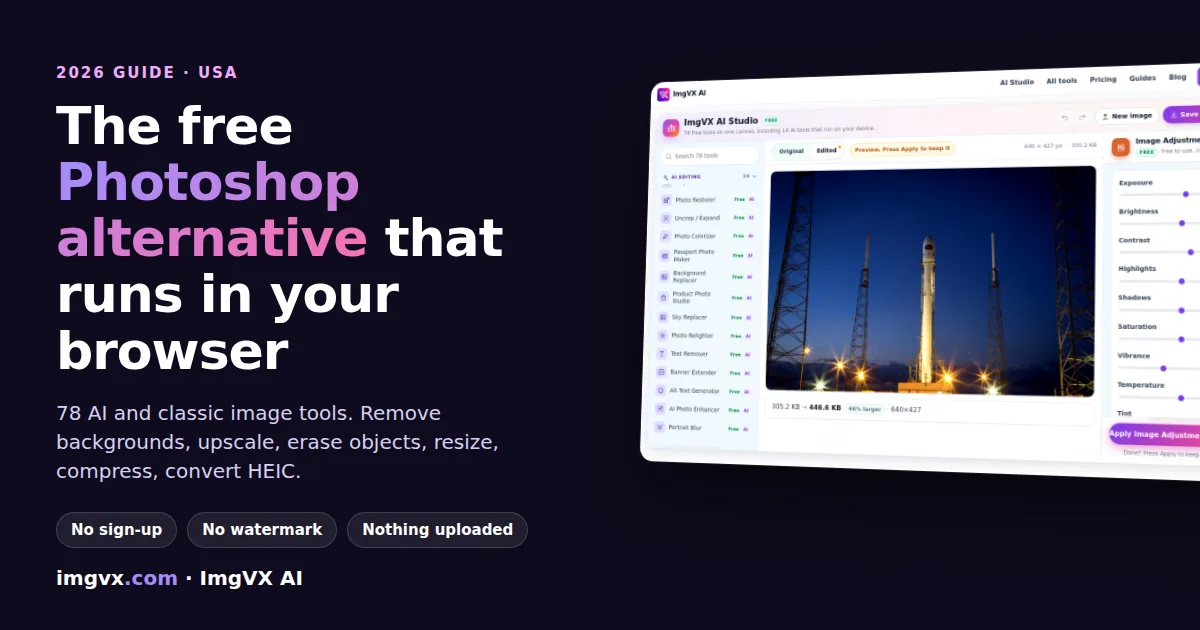
- What it is: ImgVX AI (imgvx.com) is a free online image editor with 78 tools: 62 classic tools for resizing, compressing, cropping, converting, adjusting and retouching, and 16 AI tools for background removal, upscaling, object removal, photo restoration and more.
- Free for real: no account, no daily limit, no watermark. Eleven AI tools give a free download up to 550 px and use one credit for full resolution; everything else is free at full size.
- Private: every tool, AI included, runs on your own device. Your photos are never uploaded.
- Photoshop-style workspace: the ImgVX AI Studio puts all 78 tools around one canvas with undo, redo and a before-and-after switch.
- Not a full Photoshop replacement: no layers, masks, CMYK, RAW or PSD files, and no text-to-image. The limits section says when to use something else.
What people actually search for
Search for "free photo editor" in the US and the suggestions underneath tell the real story. People are not looking for a program; they are looking for a verb. Remove background from image. Compress JPEG to 100 KB. HEIC to JPG. Make picture higher resolution. Remove object from photo. Passport photo online free. Resize image for Instagram. JPG to PDF. Each of those is one task with one right answer, and opening a full editor with dozens of panels to do it is like renting a moving truck to carry a sandwich.
That is how ImgVX AI is organized. Every tool is one job with its own page, its own presets and its own instructions, so the page you land on from a search is the page that does the thing. The map below covers the searches we see most, and the tool that answers each one.
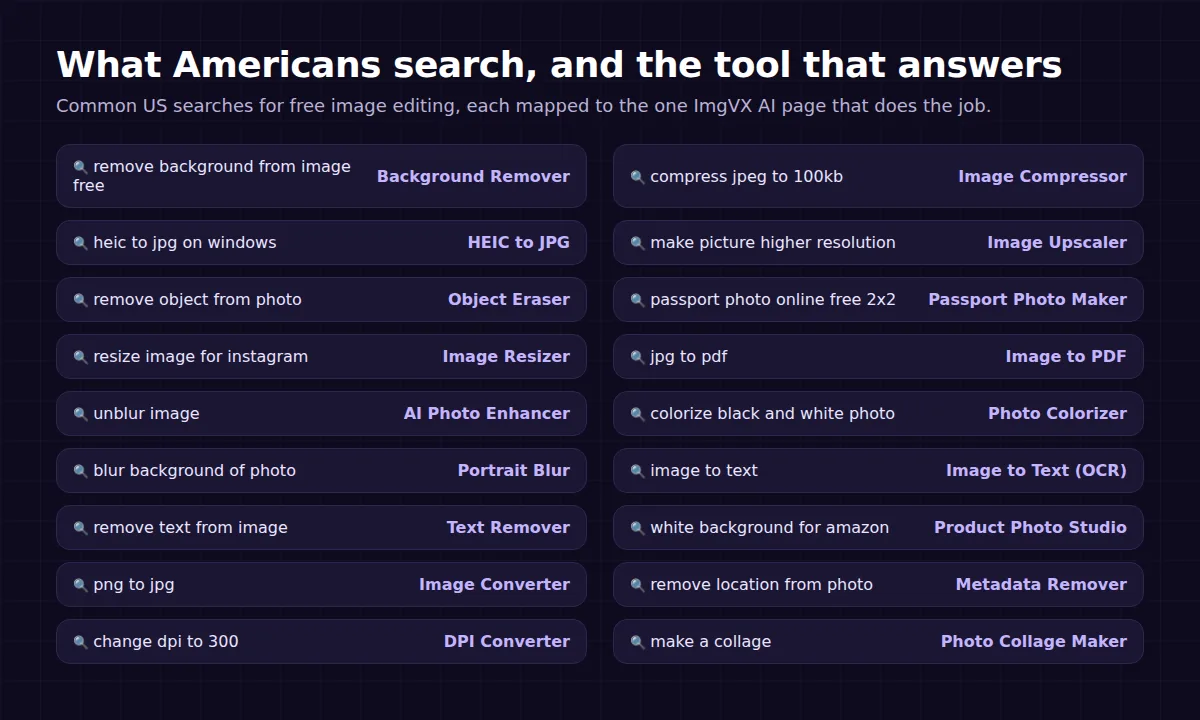
Three patterns stand out in those searches, and they shape the rest of this guide:
- Forms and uploads. A huge share of image searches come from an upload box that said no: a job portal that wants a photo under 200 KB, a visa form that wants a 600 x 600 JPEG, a website that will not take an iPhone HEIC. The fix is almost always the Image Compressor, the Image Resizer or HEIC to JPG.
- Selling and posting. Amazon, Etsy, eBay, Shopify, Instagram and YouTube all want specific sizes and, for marketplaces, clean backgrounds. That is the Background Remover, the Product Photo Studio and the platform presets in the resizer and cropper.
- Fixing a photo that matters. A blurry picture of a kid, an old family print, a holiday photo with a stranger in it. That is where the AI tools earn their place: the AI Photo Enhancer, the Photo Restorer and the Object Eraser.
Every Photoshop feature, mapped to a free tool
If you already know Photoshop, the fastest way in is by feature name. The diagram shows the headline features; the table goes further, with what each one does and the honest difference.
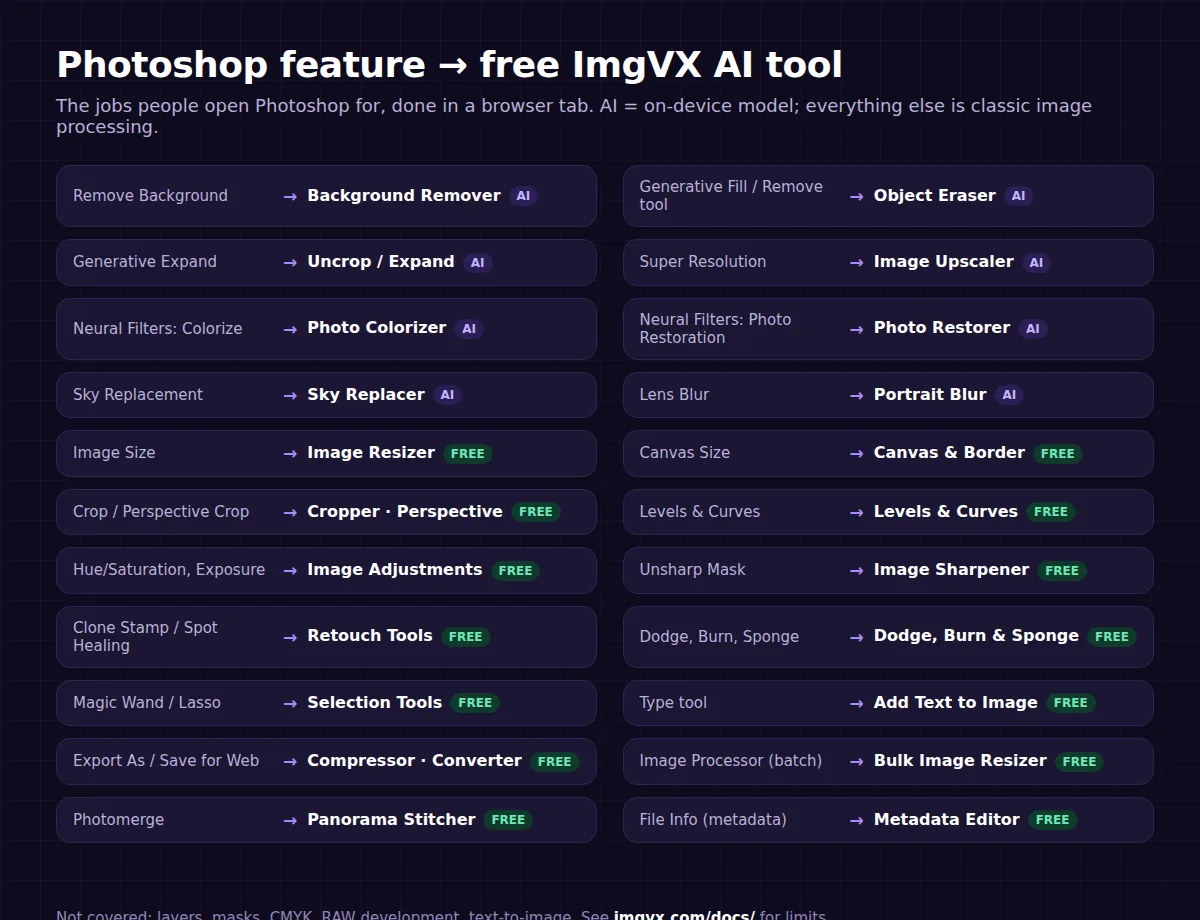
| Photoshop feature | What you use it for | Free ImgVX AI tool | Good to know |
|---|---|---|---|
| Remove Background (Quick Action) | Cut out a person, pet or product | Background Remover (AI) | Fast model for people, Best edges model for products and hair; transparent PNG |
| Generative Fill, Remove tool, Content-Aware Fill | Erase people, wires, text, blemishes | Object Eraser (AI) | Fills from the surroundings; no text prompt, no new objects |
| Generative Expand | Extend a photo past its edges | Uncrop / Expand (AI), Banner Extender (AI) | Best on skies, walls, grass and other even backgrounds |
| Super Resolution, Preserve Details 2.0 | Enlarge a small photo | Image Upscaler (AI) | 2x or 4x with Real-ESRGAN; 8x adds a resample |
| Neural Filters: Photo Restoration | Clean up old, grainy, faded scans | Photo Restorer (AI) | Optional colour in the same pass; tears are fixed with the eraser |
| Neural Filters: Colorize | Add colour to black-and-white photos | Photo Colorizer (AI) | Colours are a plausible guess, not a record |
| Sky Replacement | Swap a grey sky | Sky Replacer (AI) | Blue, sunset or stars, or your own sky photo; tints the land to match |
| Lens Blur, Depth Blur | Portrait-mode background blur | Portrait Blur (AI) | Subject stays sharp; free at full resolution |
| Neural Filters: smart lighting effects | Change the light after the fact | Photo Relighter (AI) | Golden hour, studio or neon looks, following the scene's depth |
| Camera Raw: Detail, Noise Reduction | Fix a dull, soft, noisy photo | AI Photo Enhancer (AI), Noise Reducer | Enhancer does sharpness, noise and colour in one pass |
| Image > Image Size | Exact pixel dimensions | Image Resizer | Pixels, percent or 30+ platform presets |
| Image > Canvas Size | Add space or a border without stretching | Canvas & Border | Nine anchors; make square without cropping |
| Crop tool, Perspective Crop | Trim, straighten, square up documents | Image Cropper, Perspective Corrector | Lock to 1:1, 4:5, 16:9 or a platform size |
| Levels, Curves | Set black and white points, tone curves | Levels & Curves | Live histogram and clipping readout |
| Brightness/Contrast, Hue/Saturation, Exposure, Vibrance | Everyday colour and light fixes | Image Adjustments | Nine sliders on one panel, including white balance |
| Filter > Sharpen > Unsharp Mask | Crisp up a soft photo | Image Sharpener | Real unsharp mask with amount, radius and threshold |
| Gaussian, Motion and Radial Blur | Blur effects | Image Blur | Whole frame or just the edges |
| Clone Stamp, Spot Healing Brush | Remove dust and small blemishes by hand | Retouch Tools | Clone, heal and smudge on one canvas |
| Dodge, Burn, Sponge | Lighten, darken, saturate by brush | Dodge, Burn & Sponge | Brush size and strength controls |
| Red Eye tool | Fix red eyes from flash | Red-Eye Remover | Click each eye; nothing else changes |
| Magic Wand, Lasso, Marquee | Select part of an image | Selection Tools | Cut, copy, invert or keep the selection |
| Brush, Eraser, Paint Bucket, Gradient | Paint and fill | Brush, Eraser & Fill | Undo for every stroke |
| Type tool | Captions and titles | Add Text to Image | Outline, colour and nine anchor points |
| Layer Style: Drop Shadow | Make a cut-out stand out | Drop Shadow | Transparent or coloured canvas |
| Replace Color, Color Range | Change one colour everywhere | Colour Replacer | Keeps shading and folds |
| Filter > Pixelate > Mosaic | Hide faces, plates and text | Pixelate & Censor | Use big blocks or a solid box for real privacy |
| Posterize, Threshold, Emboss, Find Edges | Graphic effects | Image Effects | Also solarize and halftone |
| Export As, Save for Web | Smaller files for the web or email | Image Compressor, Image Converter | Exact KB targets; JPG, PNG, WebP, AVIF |
| File > Scripts > Image Processor | Batch resize and convert | Bulk Image Resizer | A folder in, a zip out; free up to 5 per batch |
| Photomerge | Stitch a panorama | Panorama Stitcher | Overlapping shots into one wide image |
| Slice tool | Cut an image into tiles | Image Splitter | Instagram grid preset |
| Timeline, frame animation | Make a GIF | GIF Maker | From images or a short clip |
| File Info | Read or change metadata | Metadata Editor, EXIF Viewer | Strip GPS with the Metadata Remover |
| Histogram panel, Eyedropper | Measure exposure and colour | Histogram Viewer, Colour Picker | HEX, RGB and HSL readouts |
| Illustrator Image Trace | Turn a logo into vectors | SVG Vectorizer | Best on flat, high-contrast art |
Photoshop is a trademark of Adobe; ImgVX AI is an independent project with no connection to Adobe. The comparison is here because feature names are how many people already think about image editing.
The AI half: 16 on-device AI tools
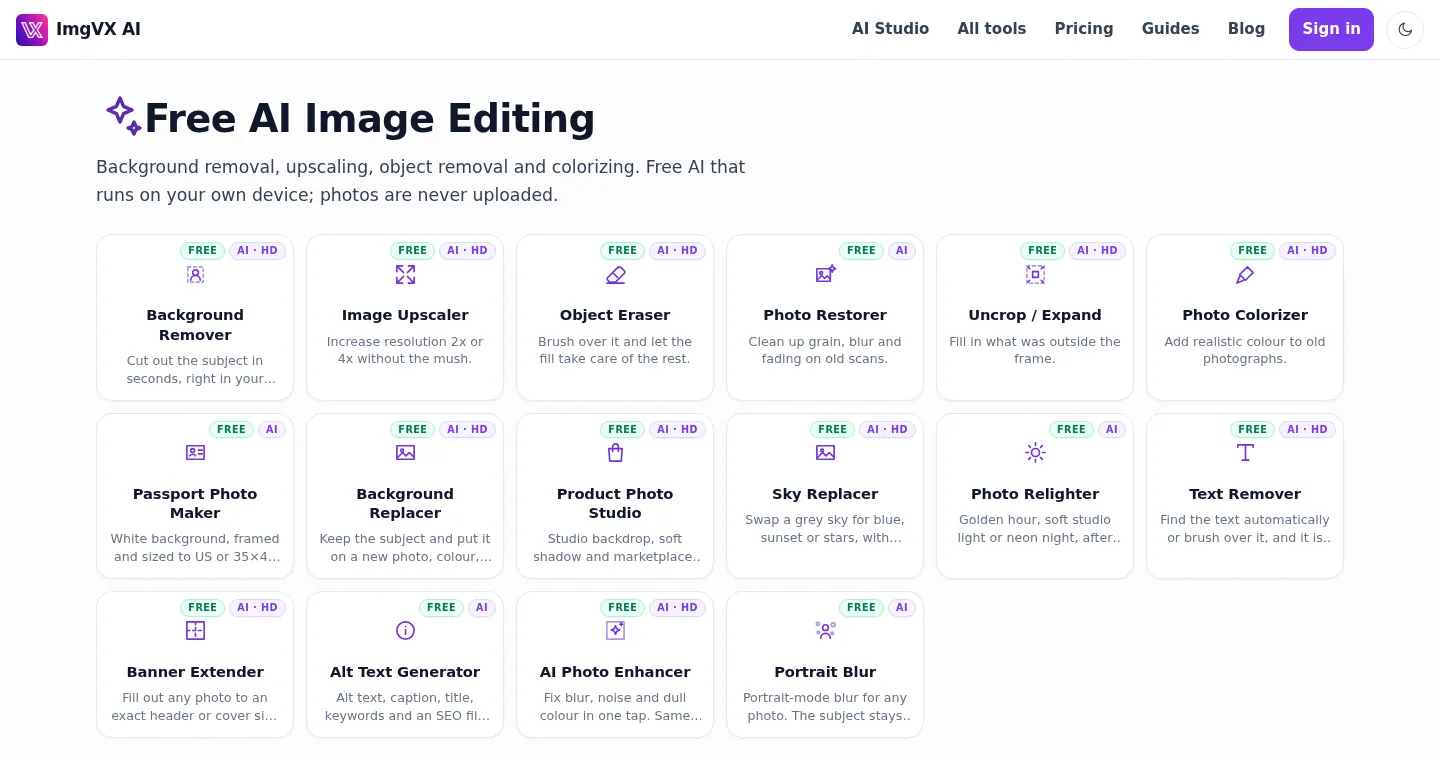
Every AI tool on ImgVX AI runs an open-source model inside your browser. The first run downloads the model, from about 5 MB to about 220 MB, and your browser keeps it; after that the tool starts at once. The model runs on your graphics card through WebGPU where the browser supports it, and on the processor through WebAssembly elsewhere. Your photo is never sent anywhere. All 16 are listed on the AI tools page.
Background Remover: the most-searched job
Open the Background Remover, add a photo and press Remove background. You get a transparent PNG of the subject. The Fast model (about 25 MB) is tuned for people; Best edges (about 110 MB) handles products, pets, hair and fine outlines better. Hair against a busy background and glass are the hard cases; the guide to clean cut-out edges shows how to fix a halo. To put the subject on something new instead of transparency, the Background Replacer takes your own photo, a colour, a gradient or a blurred copy of the original.
Image Upscaler and AI Photo Enhancer: "make picture higher resolution"
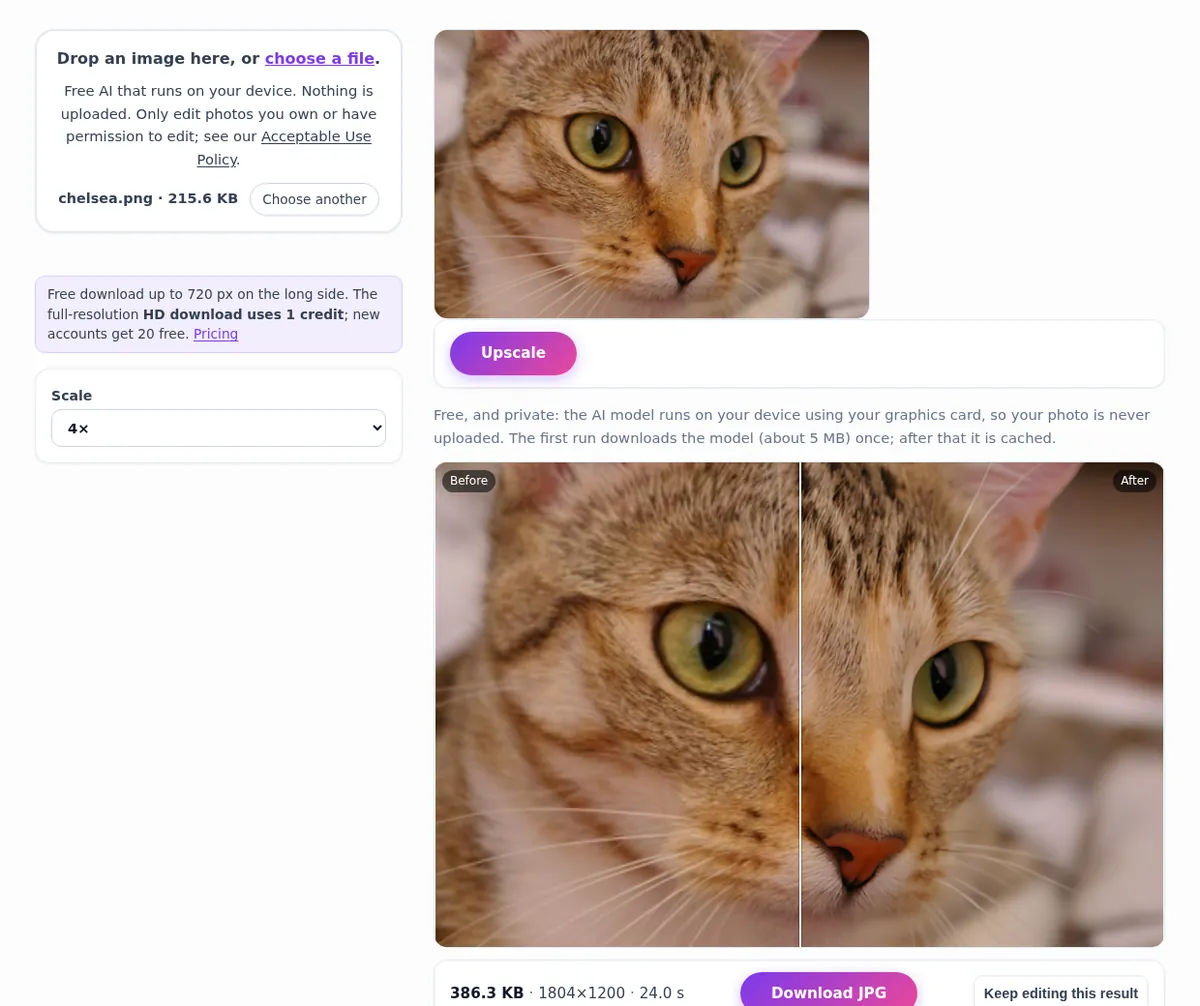
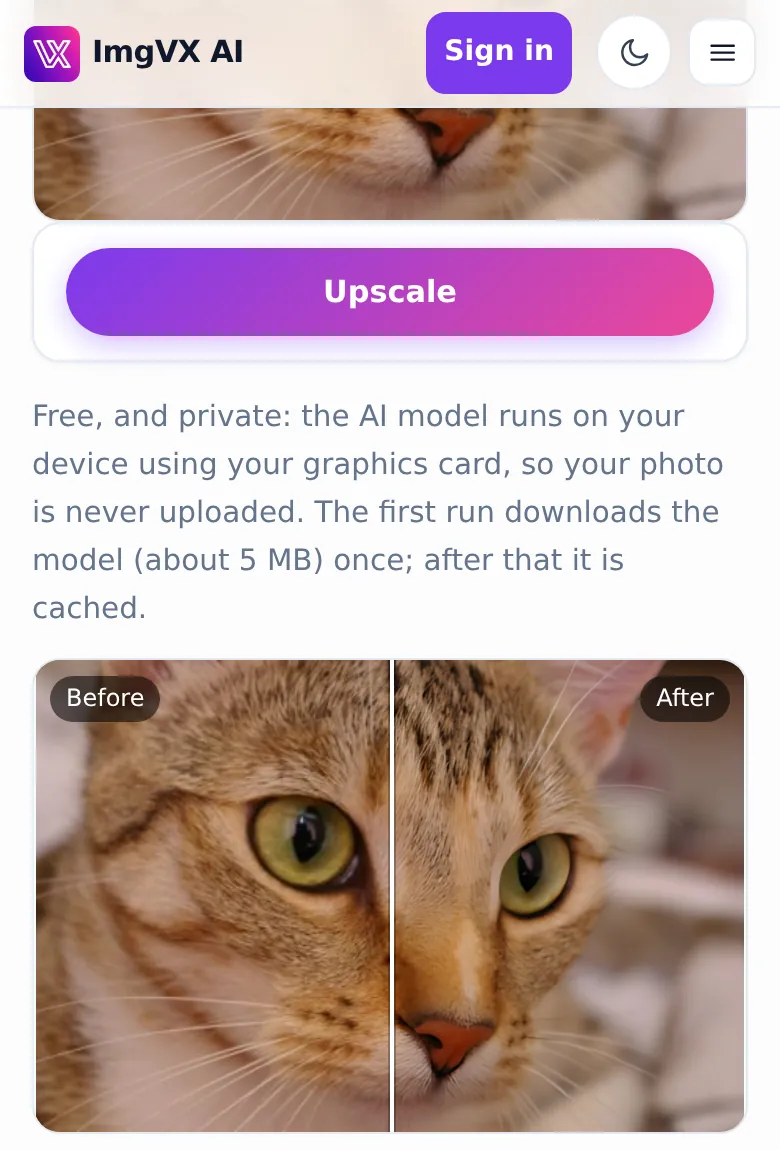
The Image Upscaler enlarges a photo 2x or 4x with Real-ESRGAN, a compact network trained on pairs of small and large photos. It is the closest free match for Photoshop's Super Resolution. We ran it on a 451 x 300 pixel photo of a cat in headless Chrome; it returned an 1804 x 1200 image in about 25 seconds on the processor alone, with no graphics card. The capture below is that run.
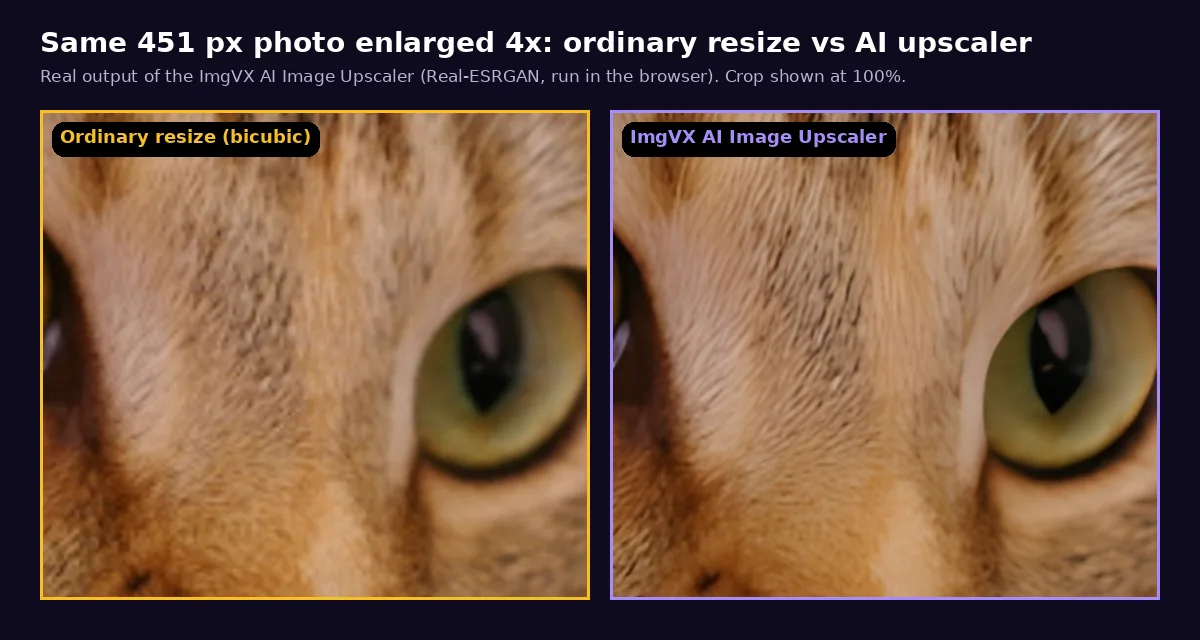
Zoomed in, the difference from an ordinary resize is clear. Bicubic resizing (what Image Size does by default) spreads the existing pixels and looks soft; the upscaler draws crisp fur and a clean edge around the eye.
Two honest caveats. The upscaler predicts plausible detail; it does not recover detail that was never captured, so tiny faces and small text can come out different from reality. And if the photo is not small but soft, noisy or compressed, the AI Photo Enhancer is the better start: same model, same size, cleaner result. Our test-based guide to unblurring a photo shows which kinds of blur can be fixed.
Object Eraser and Text Remover: the free Generative Fill for removal
Brush over a person, a power line, a trash can or a date stamp in the Object Eraser and the MI-GAN inpainting model (about 27 MB) fills the area from what surrounds it. Only the painted area changes; every other pixel stays as it was. It is excellent on grass, sand, water, sky and walls, and weaker in front of detailed structure such as windows or brick, where removing a large object in two or three smaller passes helps. The Text Remover uses the same model with automatic text detection for captions and timestamps. Neither will write new things into the photo from a prompt, which is a real difference from Generative Fill.
Photo Restorer and Photo Colorizer: old family photos
The Photo Restorer clears grain, softness and scanning dust and corrects fading in one pass, and can add colour at the same time. The Photo Colorizer runs DDColor (about 130 MB) to colourize black-and-white photos with natural skin, sky and foliage. The colours are an educated guess: clothing and cars could have been any colour, so label colourized family photos when you share them. Tears and creases are painted out afterwards with the Object Eraser. The full process, from scanning at 600 DPI to archiving, is in our vintage photo restoration guide.
Uncrop, Banner Extender, Sky Replacer, Relighter, Portrait Blur
- Uncrop / Expand adds what was outside the frame, the free counterpart to Generative Expand; the Banner Extender does the same to an exact header size such as a LinkedIn or YouTube banner.
- Sky Replacer uses a depth model (about 50 MB) to find the sky and swaps in blue, sunset, stars or your own photo, then tints the land to match.
- Photo Relighter changes the light to golden hour, soft studio or neon night, following the depth of the scene rather than sitting on top like a filter.
- Portrait Blur gives any photo a phone-style portrait mode: the subject stays sharp and the background melts away.
Product Photo Studio, Passport Photo Maker, Alt Text Generator
Three AI tools built for specific American jobs. The Product Photo Studio cuts a product out, places it on pure white or a studio backdrop with a soft shadow, and sizes it square for Amazon, Etsy, eBay, Shopify or Instagram. The Passport Photo Maker puts you on a white background framed at the US 2 x 2 inch size (600 x 600 pixels) or 35 x 45 mm. The Alt Text Generator writes alt text, a caption, a title, keywords and an SEO-friendly file name for an image, which matters for accessibility and for image search.
The classic half: 62 everyday tools
The AI tools get the attention, but the classic tools do most of the work. They follow fixed formulas, so they are instant on any device and give the same result every time. Here are the ones that answer the biggest searches.
Compress an image to an exact size
Upload forms are the single biggest reason people look for an image editor. The Image Compressor has target presets from 20 KB to 5 MB: set one and the tool searches for the highest quality that lands just under it. Below, the 4x cat from the upscaler test, a 1804 x 1200 PNG, comes out at 98.7 KB as a JPEG with the 100 KB preset.
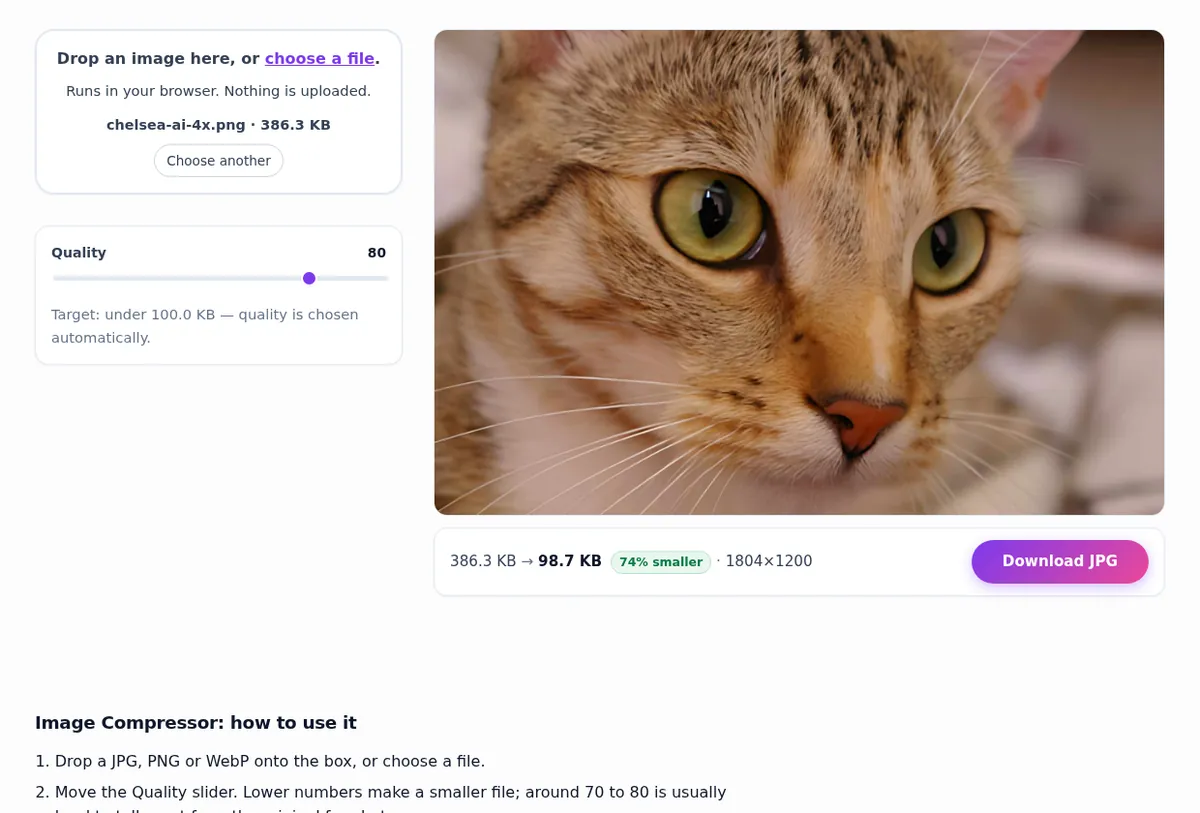
If a small target makes the photo blocky, the problem is the dimensions, not the compression: a 4000 pixel photo cannot look good at 50 KB. Resize to what the form actually displays (rarely more than 1000 pixels) and compress again. The guide to reducing file size explains the trade-off with numbers.
Resize and crop to an exact size
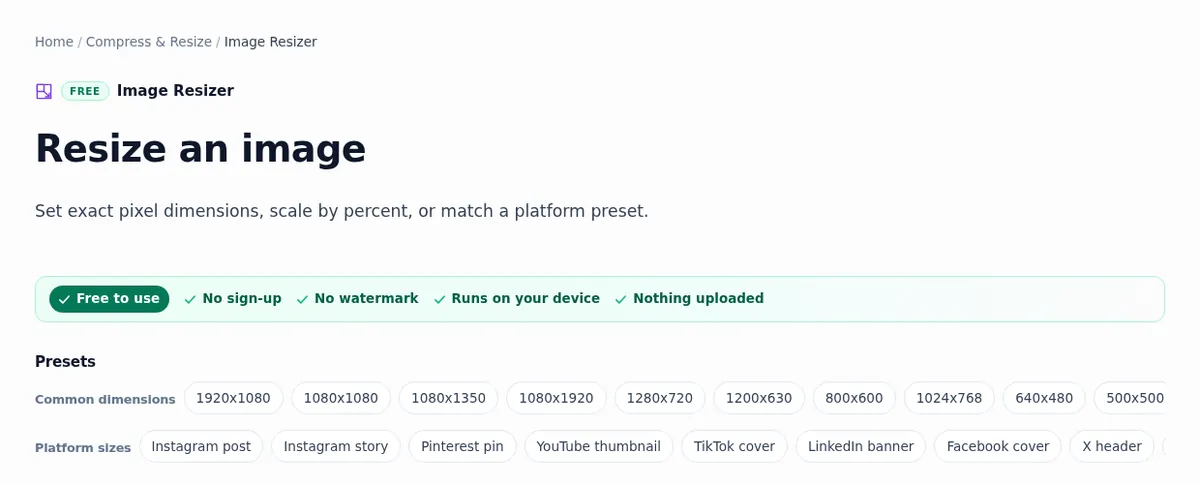
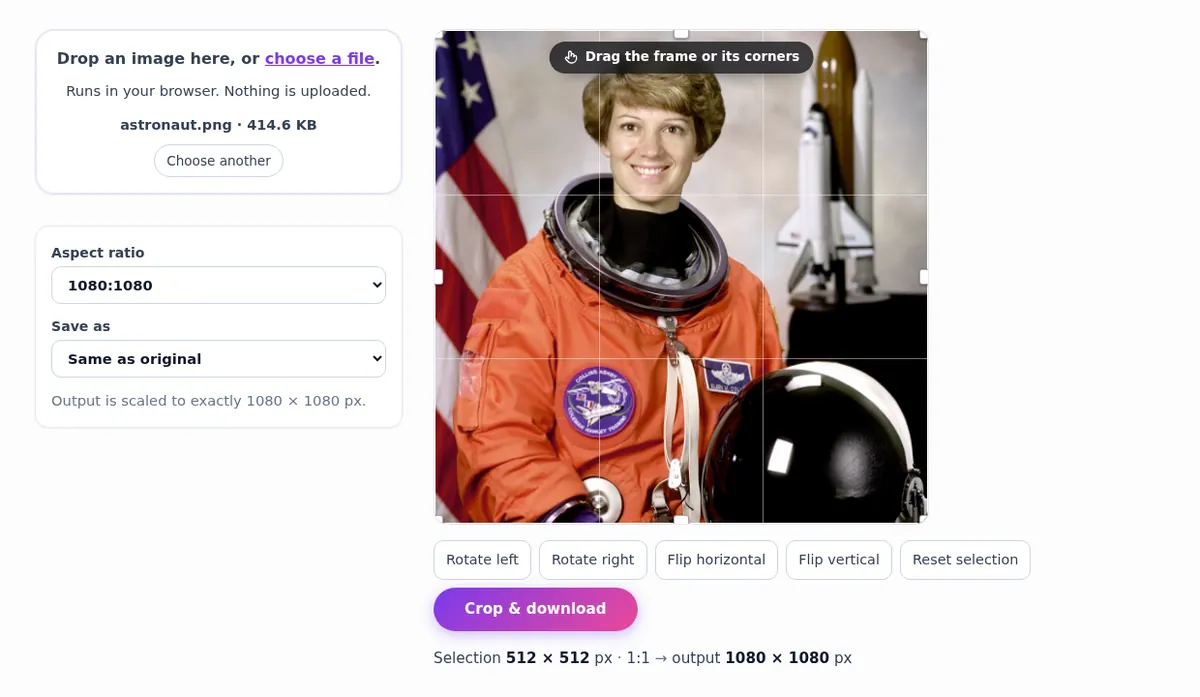
The Image Resizer sets exact pixels, scales by percent, or applies one of more than 30 presets: 1080 x 1080, Instagram story, YouTube thumbnail, LinkedIn banner, Amazon listing and more. When the shape is wrong, crop first with the Image Cropper, which locks to the ratio so nothing is stretched.
Convert formats: HEIC, PNG, JPG, WebP, PDF
iPhones save photos as HEIC, which many Windows programs, websites and forms still reject. HEIC to JPG converts them in the browser, one photo at a time. The Image Converter moves between PNG and JPG, WebP and JPG, and also opens AVIF, GIF, BMP, HEIC and TIFF files. Image to PDF turns photos of receipts and signed forms into one PDF on US Letter or A4, and PDF to Image goes the other way. The formats guide says which to pick, and how to convert images for free walks through every conversion with real results.
Adjust light and colour like Lightroom
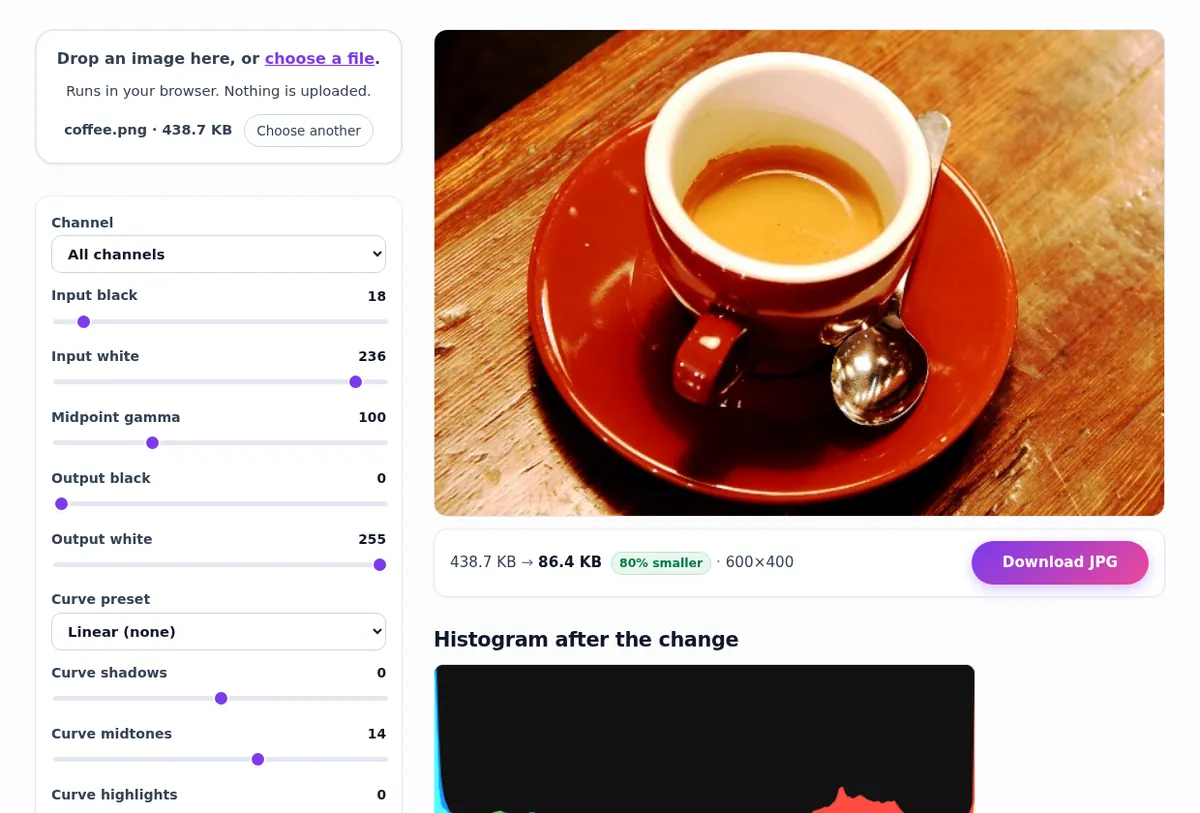
Image Adjustments puts exposure, brightness, contrast, highlights, shadows, saturation, vibrance, temperature and tint on one panel. Levels & Curves sets black and white points against a live histogram and tells you how much of the image is clipped, which is exactly how you would fix a flat photo in Photoshop.
Retouch, text, privacy and the rest
- Retouching: clone stamp and spot healing, dodge and burn, red-eye removal, unsharp mask and the noise reducer.
- Text and branding: add text, a watermark tiled or single, drop shadows, a favicon from your logo, and a vector version of a logo.
- Privacy: view hidden data with the EXIF Viewer, strip GPS location with the Metadata Remover, and hide names and numbers in screenshots with Pixelate & Censor. The screenshot privacy guide explains why light blur is not enough.
- Extract: Image to Text (OCR) in twelve languages, a colour palette from any photo, and the exact colour under the cursor with the Colour Picker.
- Fun: memes, collages, GIFs, photo to sketch, photo to cartoon, aesthetic filters and frames.
Everyday American jobs, step by step
These are the tasks that send people in the US looking for a free image editor most often, with the exact sizes the destination asks for. Rules change, so check the official page when it matters; the numbers here are correct as of this guide's date.
A US passport photo or DS-160 visa photo
A US passport photo is 2 x 2 inches with the head 1 to 1 3/8 inches from chin to top of hair, on a plain white or off-white background, taken in the last six months, with no glasses. The DS-160 visa application wants the digital version: a square JPEG from 600 x 600 to 1200 x 1200 pixels and no more than 240 KB.
- Stand about four feet from a plain white wall, facing a window, and have someone take the photo at eye level with the phone's main lens.
- Open the Passport Photo Maker, choose US 2 x 2 in, and download the 600 x 600 file.
- For the DS-160, run it through the compressor at 200 KB so it is safely under 240 KB.
- Check the head size at print scale and do not retouch, filter or reshape your face: government photos must not be digitally altered.
The passport photo guide covers shadows, framing and printing on a 4 x 6 sheet.
Prints at Walgreens, CVS, Costco or Walmart
For a sharp print, aim for 300 pixels per inch. Multiply the print size in inches by 300 and you have the pixels you need. The chart is to scale.
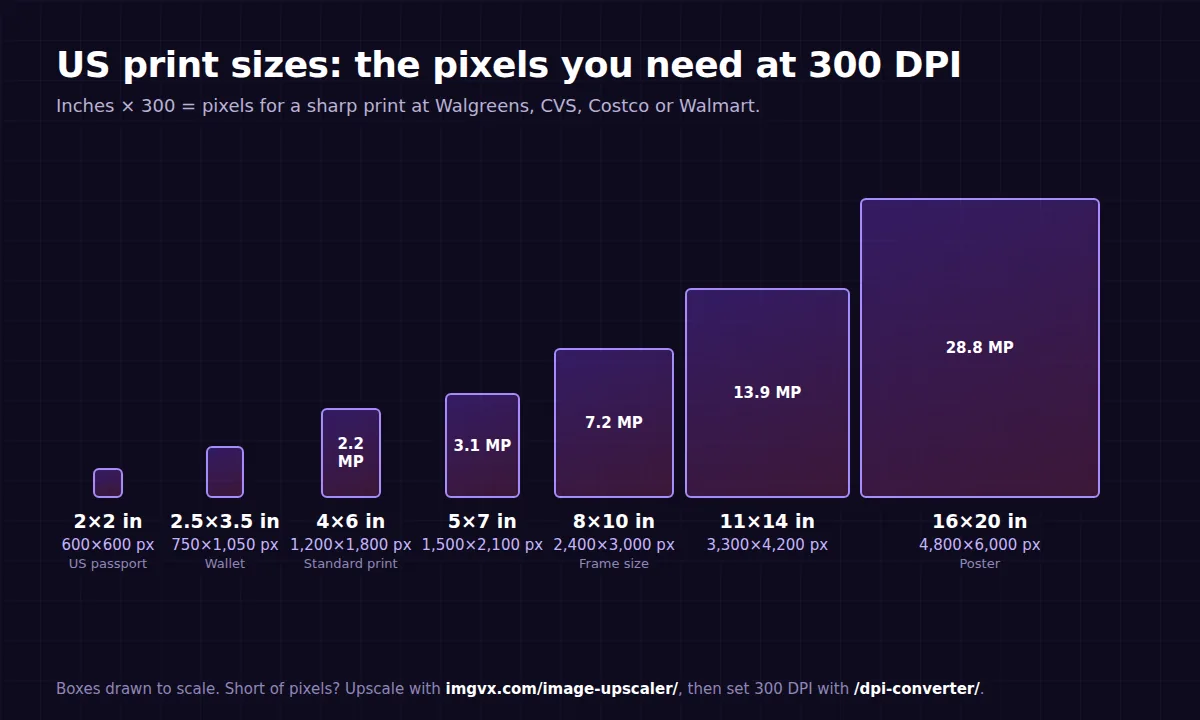
- Crop to the print's shape before ordering: a 4 x 6 is 2:3 and an 8 x 10 is 4:5, so the same phone photo is cut differently. Use the 2:3 portrait crop for a 4 x 6, or the 5:4 crop for an 8 x 10 held sideways.
- If the photo is short of pixels, enlarge it with the Image Upscaler, then set the file to 300 DPI with the DPI Converter, which changes the label without touching the pixels.
- The DPI and print size guide explains why changing DPI alone never adds detail.
Amazon, Etsy, eBay and Shopify listings
Amazon wants the main image on pure white (RGB 255, 255, 255), with the product filling about 85 percent of the frame and at least 1000 pixels on the longest side for zoom. Etsy recommends about 2000 pixels on the shortest side, eBay at least 500 pixels with 1600 recommended, and Shopify a consistent square such as 2048 x 2048.
- Shoot the product by a window on a sheet of white card, with the phone's main lens.
- Open the Product Photo Studio, choose white and the marketplace size, and download.
- Keep the other listing photos the same shape with the Etsy or eBay presets.
The full rules per marketplace are in the product photo requirements guide.
iPhone photos that will not upload
When a website, a Windows PC, a school portal or Google Docs will not take an iPhone photo, it is almost always HEIC. Convert with HEIC to JPG, or change the iPhone to Settings, Camera, Formats, Most Compatible so future photos are JPEG. The HEIC guide explains the format.
Job applications, school portals and government forms
Upload boxes commonly ask for a JPEG under 100 KB, 200 KB or 1 MB, sometimes at exact dimensions. Resize first, then compress: resize to the dimensions requested (or about 1000 pixels on the long side if none are given), then use the matching compressor preset: 50 KB, 100 KB, 200 KB or 1 MB. Scanned signatures and IDs go into one file with Image to PDF on US Letter.
Social media sizes
| Where | Size | Free tool |
|---|---|---|
| Instagram post (square / portrait) | 1080 x 1080 / 1080 x 1350 | Crop · No Crop |
| Instagram story, Reels, TikTok cover | 1080 x 1920 | Resize |
| YouTube thumbnail | 1280 x 720, under 2 MB | Resize |
| LinkedIn banner | 1584 x 396 | Extend · Resize |
| X (Twitter) header | 1500 x 500 | Resize |
| Facebook cover | 851 x 315 | Resize |
| Profile pictures | Square, cropped to a circle | Avatar Maker |
Platforms change these numbers; the social media sizes guide is kept up to date with each one.
Real estate listing photos
Straighten leaning walls with the Perspective Corrector, lift dark rooms with Levels & Curves, and fix a yellow cast with white balance. The Sky Replacer can turn a grey day blue, but check your MLS rules first: many forbid edits that misrepresent a property and some require altered photos to be disclosed. Never erase permanent features such as power lines or a neighbor's building from a listing photo.
ImgVX AI Studio: the Photoshop-style workspace
Single-task pages are fastest for one job. When a photo needs five, open the ImgVX AI Studio. Every tool sits in a searchable rail on the left, the image in the middle and the active tool's settings on the right. Changes are previewed until you press Apply, Ctrl+Z and Ctrl+Shift+Z undo and redo, the Original and Edited switch compares with the photo you started with, and Save & Download exports once as PNG, JPG or WebP.
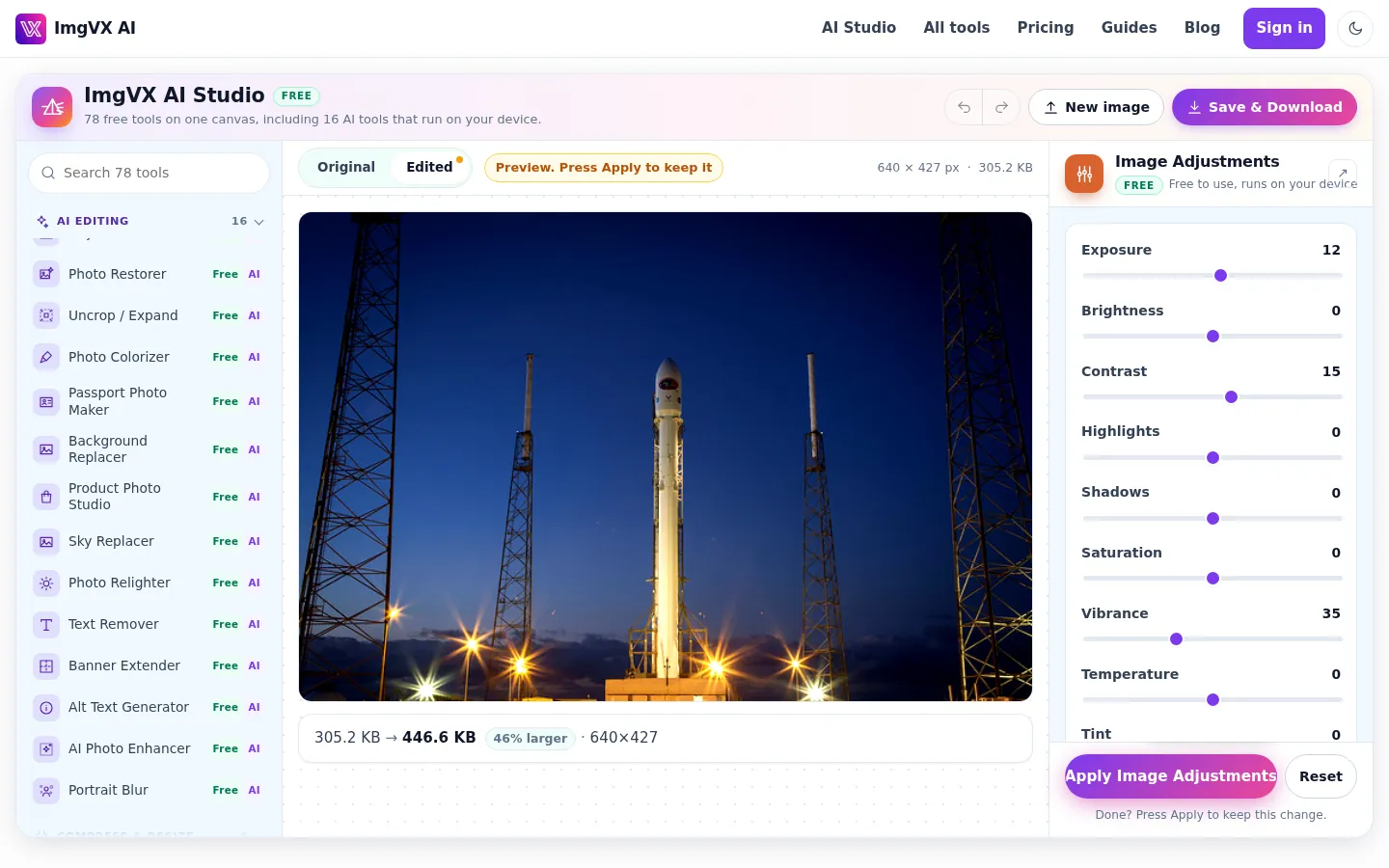
It is not Photoshop. There are no layers, so you cannot keep text editable after you apply it or stack three photos in one composition. But for the common chain (crop, fix the light, remove the background, add a shadow, compress) it is quicker than any layered editor, and nothing is installed.
On iPhone, Android and Chromebook
Every tool runs in a phone browser. Open the page in Safari or Chrome, tap to choose a photo from your library, and save the result to Photos or Files. The AI runs on the phone itself: recent phones finish an upscale in seconds, older ones take longer, and the first run of each AI tool downloads its model, which is best done on Wi-Fi.
Chromebooks are where a browser-based editor matters most, because Photoshop's desktop app and most free desktop editors do not run on ChromeOS. Everything here works in Chrome, saves to Downloads or Google Drive, and works on managed school Chromebooks where installing apps is blocked. The system requirements list speeds by device.
ImgVX AI vs Photoshop, GIMP, Photopea and Canva
There is no single best free Photoshop alternative, because people mean different things by it. This is the honest version.
| Best at | Install | Layers | Cost | |
|---|---|---|---|---|
| Adobe Photoshop | Everything, including print design, compositing and RAW | Desktop app, plus web and mobile versions | Yes | Paid subscription |
| GIMP | Layered editing and retouching for free | Desktop download (Windows, Mac, Linux) | Yes | Free, open source |
| Photopea | Photoshop-like layered editing in a browser; opens PSD files | None (browser) | Yes | Free with ads; paid tier |
| Canva | Templates for social posts, flyers and presentations | None (browser or app) | Design elements, not pixel layers | Free plan; paid Pro |
| ImgVX AI | Getting one image job done fast: background removal, upscaling, object removal, resizing, compressing, converting | None (browser) | No | Free; optional credits for full-resolution AI downloads |
Use Photoshop, GIMP or Photopea when you are building something: a poster with five photos and editable text, a composite, a print file in CMYK. Use Canva when you want a template. Use ImgVX AI when you have a photo and a job, especially when the job is AI (removing a background, upscaling, erasing, restoring) and you would rather the photo stayed on your device. Plenty of people use two: ImgVX AI to cut out and upscale, then a layered editor to compose.
How it can be free, and why nothing is uploaded
Most online AI editors run their models on rented cloud graphics cards, so every edit costs them money, which is why they cap free use, add watermarks or require a subscription. ImgVX AI sends the open-source model to your browser instead, and your own device does the work. There is no per-edit server bill to pass on, and your photo has no reason to leave your computer or phone.
The site is paid for by advertising on content pages, and by optional Pro and credit packs for full-resolution downloads from the eleven HD AI tools and for large bulk batches. Pro also removes ads. Nothing is paid for with your photos or your data. The privacy policy lists exactly what is sent and when, and the privacy section of the docs summarizes it.
What ImgVX AI cannot do
- No layers, masks or adjustment layers. Each tool changes the image; the Studio's undo is the safety net.
- No PSD, RAW or CMYK. Export from your camera software or Photoshop to JPEG, PNG or TIFF first; the tools open all three in any browser.
- No text-to-image or prompt editing. The tools edit photos you already have; nothing is generated from a description.
- No face or body reshaping. There are no tools to change a person's face, body or clothes, by design.
- Size ceiling. Photos over about 40 megapixels are scaled down to fit the browser's memory, and the page says when that happens.
- AI is a prediction. Upscaled detail, filled areas and added colour are plausible, not recovered. Keep originals of anything important.
The limits table in the docs has every number in one place.
Six complete workflows
1. Etsy listing photo from a phone snapshot
- Shoot the product on white card by a window.
- Product Photo Studio: white backdrop, soft shadow, 2000 x 2000.
- Compress under 1 MB for a fast upload.
2. Old family photo for a reunion slideshow
- Scan at 600 DPI or photograph the print flat in daylight; square it up with the Perspective Corrector.
- Photo Restorer, with colour if you want it.
- Paint out creases with the Object Eraser, then upscale 2x for a big screen.
3. LinkedIn headshot
- A well-lit photo at eye level against a plain wall.
- Portrait Blur or the Background Replacer for a clean backdrop.
- Avatar Maker, LinkedIn preset.
4. YouTube thumbnail
- Cut yourself out with the Background Remover.
- Place on a bold colour with the Background Replacer and size it with the thumbnail preset.
- Three or four large words with Add Text to Image; compress under 2 MB.
5. Screenshot for a support ticket, safely
- Cover names, emails and account numbers with solid blocks in Pixelate & Censor.
- Point at the problem with an arrow from the Shape Drawer.
- Strip metadata with the Metadata Remover before sending.
6. Vacation photo with a crowd in it
- Erase the people behind you in two or three passes with the Object Eraser.
- Swap a grey sky with the Sky Replacer or warm it up with the Photo Relighter.
- Crop for Instagram with the Instagram preset, or keep the whole frame with No Crop.
Quick fixes
- AI tool slow or stuck on the download: use Wi-Fi, keep the tab in front, avoid private windows, and use Chrome or Edge on a computer for WebGPU.
- Transparent background turned white: you saved a JPEG. Save as PNG or WebP; see transparent images.
- Compressed file got bigger: the original was already compressed harder, or you saved a photo as PNG. Keep photos as JPEG or WebP.
- Blurry after resizing: resize once from the original, and enlarge with the upscaler instead of stretching; see resize without losing quality.
Everything else is in the troubleshooting table, and the image editing FAQ answers the questions people ask before they know which tool they need.
Frequently asked questions
Is ImgVX AI really free?
Yes. All 78 tools work with no account, no daily limit and no watermark. Eleven AI tools are marked HD: their free download is up to 550 px on the long side, and the full-resolution file uses one credit (new accounts get a few free). Everything else, including the Photo Restorer, Passport Photo Maker and every classic tool, is free at full size. See pricing.
Can ImgVX AI open PSD files or work with layers?
No. ImgVX AI has no layers or masks and cannot open Photoshop PSD files or camera RAW files. Each tool changes the whole image or the area you paint, and the ImgVX AI Studio lets you chain edits with undo. For layered compositions, use a desktop editor or a browser editor with layers; the comparison explains which fits which job.
What is the free alternative to Photoshop Generative Fill?
For removing things, the Object Eraser: brush over a person, sign or wire and an inpainting model fills the area from its surroundings, on your own device. For extending a photo past its edges, use Uncrop / Expand or the Banner Extender. There is no prompt box: ImgVX AI fills from what is already in the photo and does not generate new objects from text.
Is there a free Photoshop alternative with AI that does not upload my photos?
Yes. Every AI tool on ImgVX AI downloads an open-source model to your browser and runs it on your graphics card or processor, so the photo itself never leaves your device. The help docs list each model and its download size, from about 5 MB for the Image Upscaler to about 220 MB for the alt text writer.
What is the best free Photoshop alternative for a Chromebook?
A browser-based one, because most desktop editors do not run on ChromeOS. ImgVX AI works in Chrome on any Chromebook: classic tools such as the Image Resizer and Levels & Curves are fast everywhere, and the AI tools work too, more slowly on low-cost models. Downloads save to your Downloads folder or Google Drive.
How do I make a US passport photo at home for free?
Take the photo against a plain white or off-white wall in even light, then open the Passport Photo Maker, choose US 2 x 2 in, and download the 600 x 600 pixel file. Check that your head measures 1 to 1 3/8 inches from chin to top of hair at print size, and do not filter or retouch your face. The passport photo guide covers lighting, framing and printing.
How do I compress a photo to under 100 KB for an online form?
Open the Image Compressor with the 100 KB preset, add the photo and download: it searches for the highest quality that fits. If the result looks blocky, the photo has more pixels than the form needs, so resize it to about 1000 pixels on the long side with the Image Resizer first.
Can I use images edited with ImgVX AI commercially?
Yes, if you own the original photo or have permission to use it and the people in it. ImgVX AI claims no rights over your images and adds no watermark. Product sellers can use the Product Photo Studio for Amazon and Etsy listings; the terms list what you may not create.
Why is the first AI edit slower than the next ones?
The first run downloads the AI model to your browser, which takes seconds for the 5 MB upscaler and longer for the 110 to 220 MB models. The browser keeps it, so later edits start immediately. Use Wi-Fi on a phone and avoid private windows, which forget the model. The troubleshooting table covers the rest.
Does ImgVX AI work on iPhone and Android?
Yes, in Safari or Chrome with nothing to install. Tap the drop zone to pick from Photos or Files, edit, and save the result back. Recent phones run the AI tools much faster than older ones. For iPhone photos that other sites reject, convert them with HEIC to JPG.
What is the free alternative to Photoshop Super Resolution?
The Image Upscaler. It runs Real-ESRGAN, a neural network that predicts sharp edges and clean texture, to enlarge a photo 2x or 4x (8x with an extra resample) in your browser. It makes small photos look much better at large sizes but cannot recover detail that was never captured, so check faces and small text before printing.
How do I convert iPhone photos to JPG for free on Windows?
Drop the HEIC files onto HEIC to JPG in any browser; it writes standard JPEGs that open everywhere, and nothing is uploaded. To stop the problem at the source, set the iPhone to Settings, Camera, Formats, Most Compatible. The HEIC guide explains why iPhones use HEIC.
Do the Photoshop job, skip the Photoshop
78 free tools in your browser. No sign-up, no watermark, nothing uploaded.