
How to Add a Frame to a Photo Online (Free)
To add a frame to a photo online, open a free frame tool, drop in your picture, pick a frame style and download the result. The free Photo Frames tool offers a Polaroid, a film strip, a gallery mat, a rounded card, a wood frame and a plain border, with an optional caption, and draws the frame in your browser. There is no sign-up and no watermark, and your photo is never uploaded.
The short answer
- Tool: Photo Frames. No AI model, nothing to install.
- Frames: Polaroid, film strip, gallery mat, rounded card, wood and plain border.
- Caption: on the Polaroid and the gallery mat, up to 80 characters.
- Watch for: the frame makes the picture bigger and changes its shape, so resize or fit it afterwards if a site wants exact dimensions.
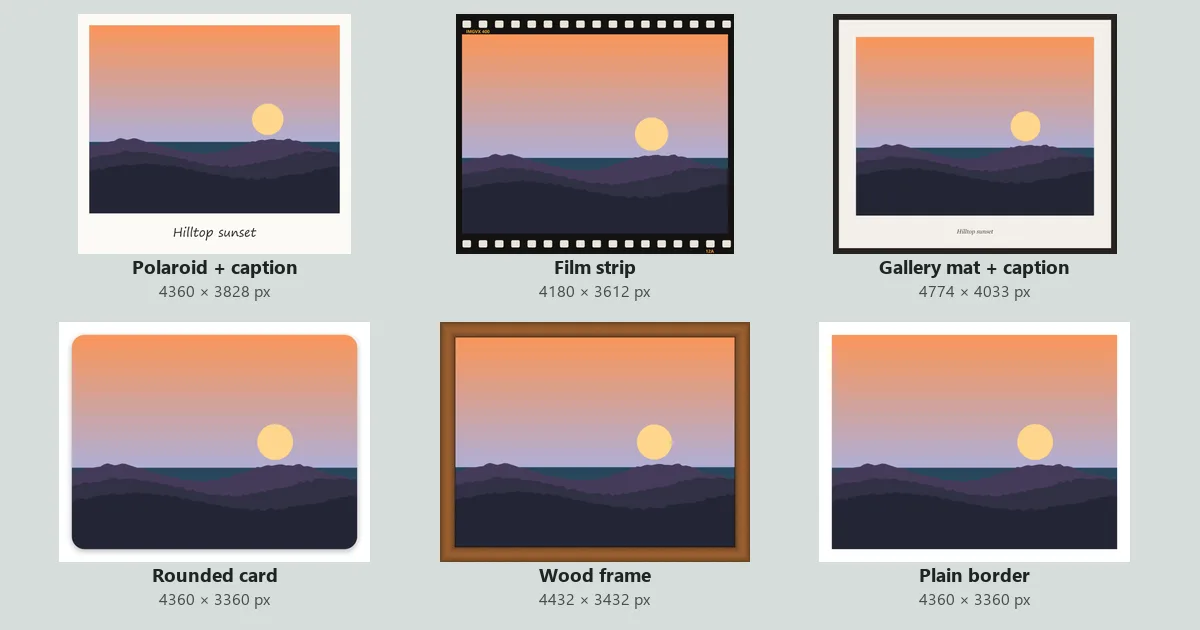
How to add a frame to a photo in four steps
- Open the tool and add the photo. Open Photo Frames and drop in your photo. The first preview appears straight away.
- Choose the Frame. The preview updates each time you change it, so you can try all six in a few seconds.
- Set the Frame size, and a Colour or Caption. Colour works on the plain border and the rounded card; Caption works on the Polaroid and the gallery mat.
- Pick the format under Save as and download. JPG is the default and right for most photos. PNG keeps every pixel, and WebP makes the smallest file for a website.
Which frame to choose
We ran one 4000 × 3000 px test landscape through every frame at the default frame size. These are the sizes the tool downloaded:
| Frame | Looks like | Output size | Good for |
|---|---|---|---|
| Polaroid | Off-white border with a deep bottom edge | 4360 × 3828 px | Memory posts, invitations, scrapbooks |
| Film strip | Black film with sprocket holes top and bottom | 4180 × 3612 px | Travel and street photos, a retro feed |
| Gallery mat | Dark outer frame, cream mat and a thin bevel line | 4774 × 3774 px (4033 with a caption) | Artwork, portfolio pieces, a print on a wall |
| Rounded card | Rounded corners with a soft shadow on a colour | 4360 × 3360 px | Websites, slides, product shots |
| Wood frame | Brown wood grain with a shaded edge | 4432 × 3432 px | A "framed on the wall" look, gift mock-ups |
| Plain border | An even border in any colour | 4360 × 3360 px | A clean white edge for a feed or a print |
The file sizes stayed close to the original's 253 KB for most frames (190 to 276 KB as JPG). The wood frame was the exception at 697 KB, because its grain is fine detail that JPG cannot squeeze as well as a flat colour.
How big the frame will be
The Frame size slider runs from 2 to 20, and it is a percentage of the photo's shorter side. The default is 6. On our 3000 px tall test image that made a 180 px border, so the plain border added 360 px to each dimension. At 2 the picture grew to 4120 × 3120 px, and at 20 to 5200 × 4200 px.
Because it is a percentage, the frame looks the same on a small phone photo and a large camera file. A border is never thinner than 4 px, so even a tiny image gets a visible edge. The other frames scale the same base width:
- Polaroid: the sides and top use the base width, and the bottom is 3.6 times as deep, which leaves room for the caption.
- Film strip: the black bands at the top and bottom are 1.7 times the base width, and the sides are half of it.
- Gallery mat: a dark frame of about half the base width, then a mat of 1.6 times it. A caption adds a strip under the photo.
- Wood frame: 1.2 times the base width on every side.
The photo itself is not resized. It is drawn at its own pixel size, so a frame never makes it softer.
How to make a Polaroid-style photo
Choose Polaroid, type a short caption and download. Short captions work best: a place and a month, a name, or a date, such as Hilltop sunset in our example. The tool writes it centred in the deep bottom edge and shrinks it to fit if it is too long; anything past 80 characters is cut.
The caption uses a handwriting font that your device already has, such as Segoe Print on Windows or Bradley Hand on a Mac, so the lettering looks a little different from one computer or phone to the next. If you want an exact font, leave the caption empty and add the words afterwards with Add Text to Image.
For reference, real Polaroid i-Type film is 3.483 × 4.233 inches, with a picture area of about 3.1 inches square, according to Polaroid's support pages. That makes the real bottom edge deeper than ours. If you want the classic square look as well, crop the photo to 1:1 with the Image Cropper before you frame it.
How to post a framed photo on Instagram
A frame changes the photo's shape. Our 4:3 landscape came out at 4360 × 3828 px as a Polaroid, which is close to square, and a portrait photo grows taller still. Instagram accepts feed photos between 1.91:1 and 4:5 and crops anything outside that. Two simple fixes:
- Fit it: put the framed picture through No Crop and choose 4:5. It adds a background around the frame instead of cutting into it. See how to post a full picture on Instagram without cropping.
- Size it: resize the result to 1080 px wide with the Image Resizer, which is all Instagram shows and keeps the upload quick.
For the other networks, our social media image sizes guide lists the current shapes.
How to print a framed photo
Photo labs print fixed shapes, such as 4 × 6 inches, which is 3:2. A framed picture is rarely exactly 3:2, so the lab either crops into your frame or adds a white edge of its own. To avoid both:
- Frame the photo.
- Open the result in Canvas & Border and expand the canvas to the print shape in the frame's own colour, or crop it to 3:2 with the Image Cropper if the frame has room to spare.
- Check the pixels against the print size in our DPI guide. A 4 × 6 print at 300 DPI needs 1800 × 1200 px.
Save as PNG or a high-quality JPG for print. If the picture is going on a holiday card, our holiday photo card guide covers layouts and bleed.
When to use a different tool
| You want | Use |
|---|---|
| A border of an exact pixel width, or a transparent margin | Canvas & Border |
| A shadow under a cut-out product or logo | Drop Shadow |
| Several photos in one framed layout | Photo Collage Maker |
| Hearts, stars or emoji on top of the photo | Photo Stickers |
| A whole photo in a square or story shape | No Crop |
The rounded card fills its corners with the colour you choose rather than leaving them transparent, so pick the colour of the page the picture will sit on.
Frequently asked questions
How do I add a frame to a photo for free?
Open the free Photo Frames tool, drop in the photo, choose a frame and download. There is no sign-up and no watermark, and the photo is not uploaded: the frame is drawn in your browser.
How do I make a photo look like a Polaroid?
Choose the Polaroid frame in Photo Frames and type a short caption, such as a place and a year. The tool adds an off-white border with a deep bottom edge and writes the caption there in a handwriting-style font.
Does adding a frame lower the quality of my photo?
No. The photo is drawn at its own pixel size and the frame is added around it, so nothing is scaled. Saving as JPG compresses the whole picture once more; choose PNG if you plan to edit it again.
Why is my framed photo bigger than the original?
The frame goes around the photo, not over it. At the default frame size a 4000 × 3000 px photo becomes 4360 × 3360 px with a plain border. To hit an exact size, resize the framed picture afterwards with the Image Resizer.
Can I add a frame without cropping the photo for Instagram?
Yes. A frame never crops your photo, but it changes its shape. For a feed post, run the framed picture through No Crop at 4:5 so Instagram shows all of it.
Can I frame several photos at once?
Photo Frames works on one photo at a time. To put several photos together with a border around each, use the Photo Collage Maker and set the spacing and background colour.
Sources: frame styles, frame-size range, caption length and fonts checked against the Photo Frames code on 3 November 2026; output sizes and file sizes come from the live tool, run on a synthetic 4000 × 3000 px test image. Polaroid i-Type film and picture-area dimensions: Polaroid Support, "What are Polaroid photo dimensions". Instagram's 1.91:1 to 4:5 feed range: Instagram Help Centre. 4 × 6 inch print pixels are worked out at 300 DPI.
Frame your photo now
Free, in your browser, with no sign-up and no watermark.