
How to Add a Drop Shadow to an Image Online (Free)
To add a drop shadow to an image, place it on a slightly larger canvas and draw a soft, dark copy of its shape behind it, offset a little downward. Use a transparent PNG if the shadow should follow the subject, keep the shadow faint, and save as PNG or WebP. The free Drop Shadow tool does this in your browser, with no sign-up, and your image is never uploaded.
The short answer
- Tool: Drop Shadow. No AI model, and no watermark on the download.
- Defaults: Padding 60, Shadow blur 24, Offset down 12, Shadow opacity 35, black.
- Output: larger than your image by twice the padding, because the shadow needs room.
- Watch for: blur and offset are in pixels, so a large photo needs larger values.
How to add a drop shadow in four steps
- Start with the right file. For a shadow around a product or logo, use a transparent PNG. If yours has a background, remove it with the Background Remover. A photo or screenshot can go straight in.
- Open the tool and drop it in. Open Drop Shadow and add the image.
- Set the shadow. Adjust Shadow blur, Offset down and Shadow opacity. The next two sections give values to start from.
- Choose the background and download. Keep Transparent background ticked to place the image on any page, or untick it and pick a colour. Save as PNG or WebP to keep the transparency.
Drop shadow settings that look natural
A natural shadow has soft edges, sits mostly below the object, and is much lighter than black. That combination reads as light from above. Each control changes one part of it:
| Control | Range | Default | What it changes |
|---|---|---|---|
| Shadow blur | 0 to 100 | 24 | How soft the edge is; 0 gives a hard copy of the shape |
| Offset down | -80 to 80 | 12 | How high the object seems to float |
| Offset across | -80 to 80 | 0 | Which side the light comes from |
| Shadow opacity | 5 to 100 | 35 | How dark the shadow is |
| Padding | 0 to 200 | 60 | The empty space added on every side |
Keep the offset at about half the blur, as the defaults do. If the object should look further off the page, raise both and lower the opacity a little. These are starting points, not rules, so judge the result at the size it will be seen.
Why the same settings look different on a large photo
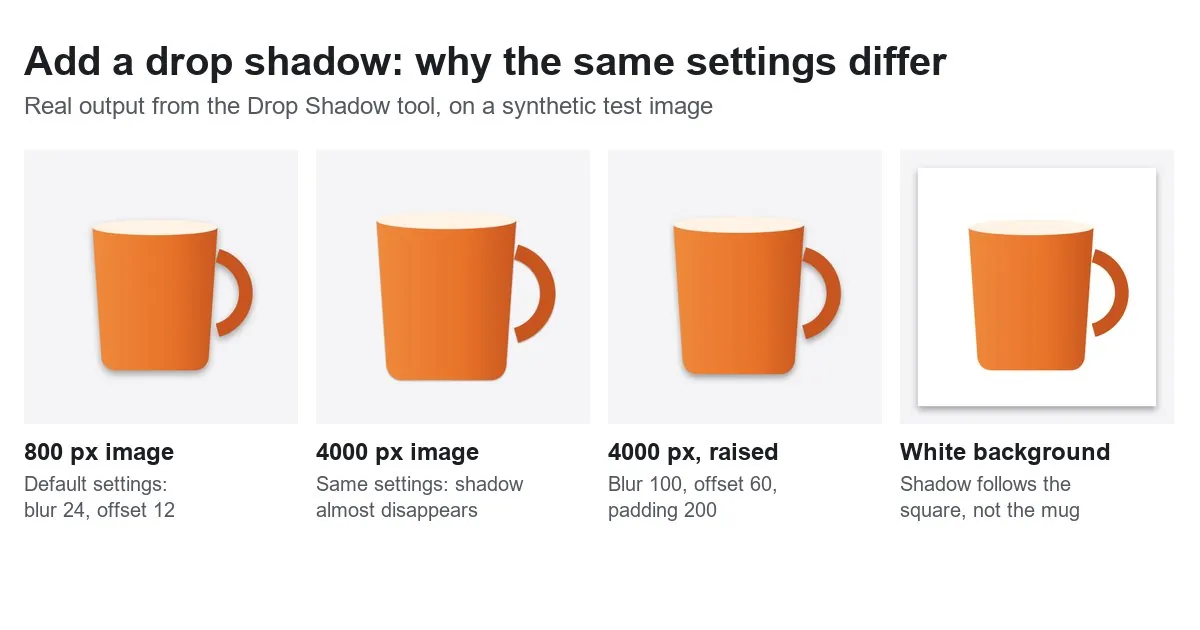
This is the part most shadow guides skip. Blur and offset are measured in pixels of the image, not as a share of it. Blur 24 is 3% of the width of an 800 px image, but only 0.6% of a 4000 px one. Once that photo is scaled down to fit a page, the shadow all but disappears, as the second panel of the figure shows.
To keep the same look, scale the values with the image:
| Image width | Shadow blur | Offset down | Padding |
|---|---|---|---|
| 800 px | 24 | 12 | 60 |
| 1200 px | 36 | 18 | 90 |
| 2000 px | 60 | 30 | 150 |
| 3300 px | 100 (slider maximum) | 50 | 200 (slider maximum) |
Above about 3300 px the blur slider runs out. If you need a soft shadow on a bigger image, make it smaller first with the Image Resizer. Most web images do not need that many pixels anyway, and the file gets much lighter: our 4000 px test image came out as a 4.7 MB PNG, the 2000 px one as 1.4 MB.
Why your shadow looks like a box
A shadow copies the shape of the visible pixels. A JPG has no transparency, so every pixel is visible and the shape is a rectangle, white background included. The fourth panel of the figure shows the result: a shadow around the square, none around the mug.
That is what you want for a photo print, a card or a screenshot. For a product or logo, remove the background first. If the subject sits on one flat colour, the chroma key method can be cleaner, and our guide to transparent backgrounds covers the other routes. A thin fringe around a cut-out shows up more once it has a shadow, so check how to get clean edges if yours looks rough.
Why your shadow is cut off
A shadow can only exist on the canvas. If the padding is smaller than the shadow's reach, the edge slices through it in a straight line, which is easy to miss on a white preview and obvious on a coloured page. We measured how far the shadow reaches from a 400 px square:
| Blur / offset down | Below | Each side | Above |
|---|---|---|---|
| 0 / 12 | 12 px | 0 px | 0 px |
| 24 / 12 (default) | 39 px | 27 px | 15 px |
| 40 / 16 | 61 px | 45 px | 29 px |
| 100 / 80 | 200 px | 120 px | 40 px |
The pattern gives a simple rule: the shadow reaches about 1.1 times the blur, plus the offset. At the default settings, Padding 0 removes the shadow entirely, Padding 20 cuts it off, and Padding 40 leaves it whole. Padding also makes the file bigger, by twice its value in each direction: an 800 × 800 image with Padding 60 comes out at 920 × 920. If you need an exact final size, run the result through the Image Resizer afterwards.
PNG, WebP or JPG?
A soft shadow is made of partly transparent pixels, so the format matters. We saved the same 920 × 920 result three ways:
| Format | File size | Transparent? | Use it for |
|---|---|---|---|
| PNG | 278 KB | Yes | Design tools, documents, anywhere that accepts it |
| WebP | 27 KB | Yes | Websites, where size matters |
| JPG | 25 KB | No, filled with white | White pages and places that only accept JPG |
Your numbers will differ, since this is a simple synthetic image, but the order is typical. If you need a JPG on a coloured page, untick Transparent background and set Background colour to match, so the shadow blends into the right colour. Our guide to transparent images explains why JPG cannot do this.
Dark pages and rounded corners
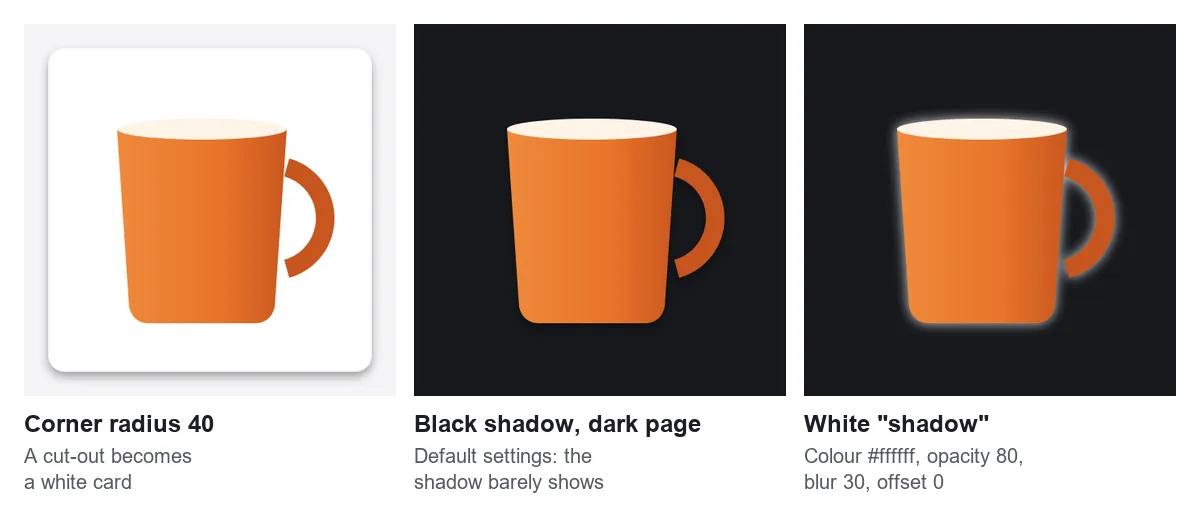
- Corner radius is for photos and screenshots. It rounds the corners by placing the image on a white rounded rectangle. On a cut-out that turns the transparent area white, so leave it at 0 for logos and products.
- A black shadow fades on a dark page. There is little contrast left to work with. Change Shadow colour to white, set Offset down to 0, and it becomes a glow.
- Pure black is not required. On a coloured page, try a darker shade of that colour as the shadow colour, which sits on the page more softly.
When to use a different tool
| You want | Use |
|---|---|
| A shadow on the floor under a product | Product Photo Studio, with a soft floor shadow or mirror reflection |
| A screenshot on a gradient with rounded corners | Screenshot Beautifier |
| A shadow behind words on a photo | Add Text to Image, with its Drop shadow option |
| A plain border and no shadow | Canvas & Border |
A drop shadow lifts an object off the page. It does not put it on a surface, so a product photo for a shop usually looks better with a floor shadow. Marketplace photo rules are also worth checking first, since each site sets its own requirements for the main image.
On your own website there is a third option: leave the image alone and use CSS. box-shadow follows the rectangle, while filter: drop-shadow() follows the transparent shape. A CSS shadow can change with the design, but it only exists on that page, so use a baked-in shadow for anything that will be downloaded, pasted or uploaded elsewhere.
Frequently asked questions
How do I add a drop shadow to an image for free?
Open the free Drop Shadow tool, drop in the image and adjust the blur, offset and opacity. Keep Transparent background ticked and save as PNG or WebP. There is no sign-up and no watermark, and the image stays on your device.
Why does my drop shadow look like a box?
A shadow takes the shape of the opaque pixels. A JPG, or a PNG with a solid background, is a full rectangle, so the shadow is one too. Cut the subject out first with the Background Remover, then add the shadow to the transparent PNG.
What are good drop shadow settings?
On an 800 px image, the defaults are a good start: blur 24, offset down 12, opacity 35, black. Raise blur and offset in proportion on larger images, because both are measured in pixels. Keep the offset at about half the blur. More help: ImgVX AI help docs.
Why is my shadow cut off at the edge?
The canvas is too small for it. With blur 24 and offset 12 the shadow reaches 39 px below the image, so Padding 20 cuts it off and Padding 40 does not. Allow about 1.1 times the blur plus the offset. Browse: all free image tools.
Which format keeps the shadow transparent?
PNG and WebP both keep it. JPG has no transparency, so the tool fills the empty area with white, and the shadow only looks right on a white page. In our test WebP was about a tenth of the size of the PNG.
Can I add a shadow to a transparent logo?
Yes. The shadow follows the logo's outline as long as Corner radius stays at 0. Any radius above 0 puts the logo on a white rounded card, so the transparency is lost.
Sources: settings and behaviour checked against the Drop Shadow tool's code on 1 November 2026. The measurements come from that code run in Chromium on synthetic test images, so your file sizes will differ. CSS behaviour: MDN Web Docs, box-shadow and drop-shadow().
Add your drop shadow now
Free, in your browser, with no sign-up and no watermark.