
How to Remove Text From an Image Free (Tested)
To remove text from an image, open the free Text Remover, drop in the picture, press Find text or paint over the words with the brush, and press Remove painted text. The AI fills the painted area from the pixels around it, and nothing is uploaded. Below are real results from our tests: how big the brush must be, what Find text misses, which backgrounds work and which smear, and when cropping is the better fix.
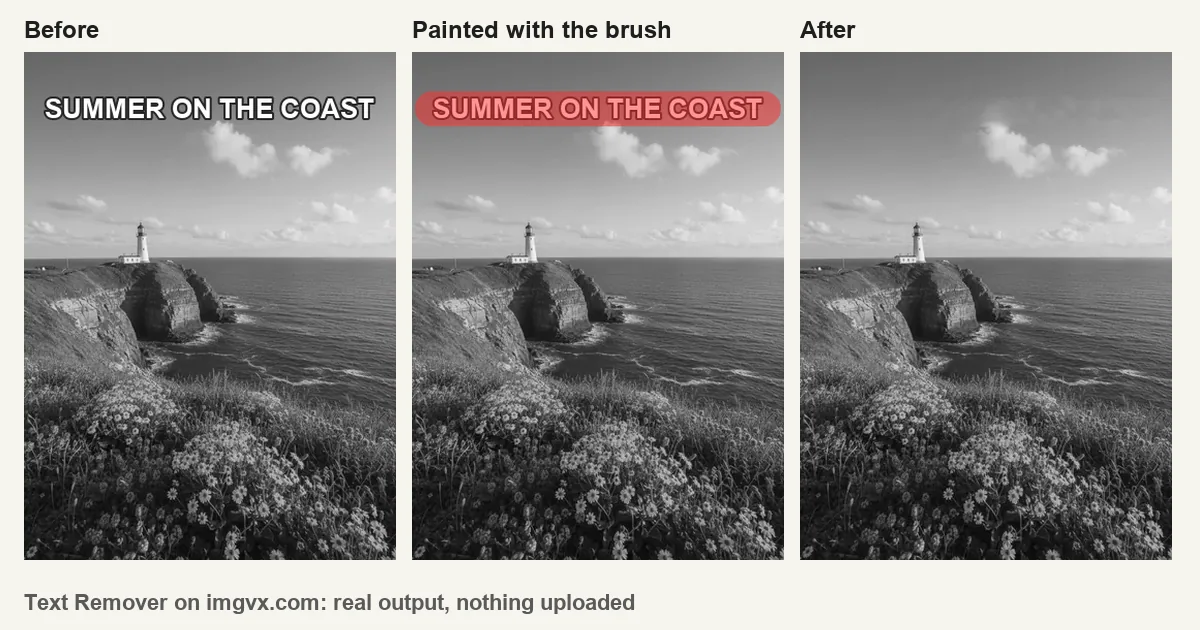
The short answer
- Tool: Text Remover. Free, no account, no watermark, picture stays on your device.
- Two ways to mark text: the brush, or Find text (an OCR engine). In our tests the brush was more reliable than Find text.
- Brush wider than the letters: a brush of 8 left ghosts of the outline, a brush of 34 left clean sky.
- Works best on text over sky, a plain floor, a wall or a soft flower; worst over a detailed object such as a tram.
- Only for pictures you have the right to edit. Not for taking watermarks off other people’s work.
How do you remove text from an image in five steps?
- Open the Text Remover in any current browser and drop in your picture.
- Mark the text. Either press Find text, which boxes every word the OCR engine can read, or paint over the words yourself.
- Check the red marks. Paint over any words that were missed. If a box landed on something that is not text, press Clear painting and paint the text by hand instead.
- Press Remove painted text. The first run downloads the AI model, which the tool says is about 27 MB plus a few MB for text detection, and caches it, so the first run takes longer than the next ones.
- Compare and download. Check the area at full size, then save the PNG. If it looks smeared, clear the painting and paint a smaller area.
Only the painted area changes. The fill model is MI-GAN, a small inpainting model that its authors built for mobile devices and presented at ICCV 2023, and it runs inside your browser tab, so a private photo or a screenshot never leaves your device.
How big should the brush be?
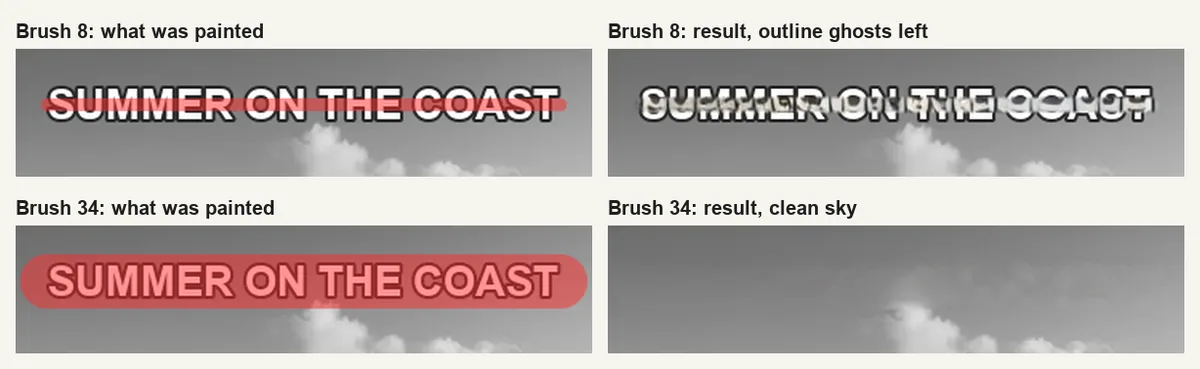
The Brush size slider runs from 5 to 150 and starts at 40. We tested two sizes on a bold white caption with a black outline over a sky: a brush of 8, which draws a thin line through the middle of the letters, and a brush of 34, which covers the whole caption.
| Brush | What was painted | Result |
|---|---|---|
| 8 | A thin line through the middle of the letters | The outline stayed: ghosts of every letter remained |
| 34 | The whole caption, with a margin around it | Clean sky, with the clouds beside it untouched |
The lesson is that the fill only replaces what you paint. A bold caption usually has a dark or light outline around the letters, and if the brush does not reach the outline it is left behind. Paint a little beyond the text on every side, and keep the brush small enough not to cover other things you want to keep. The authors of MI-GAN also recommend small, incremental brush strokes for large areas of high-resolution images, so a long caption is better done in two or three passes than in one huge stroke.
Does the Find text button work?
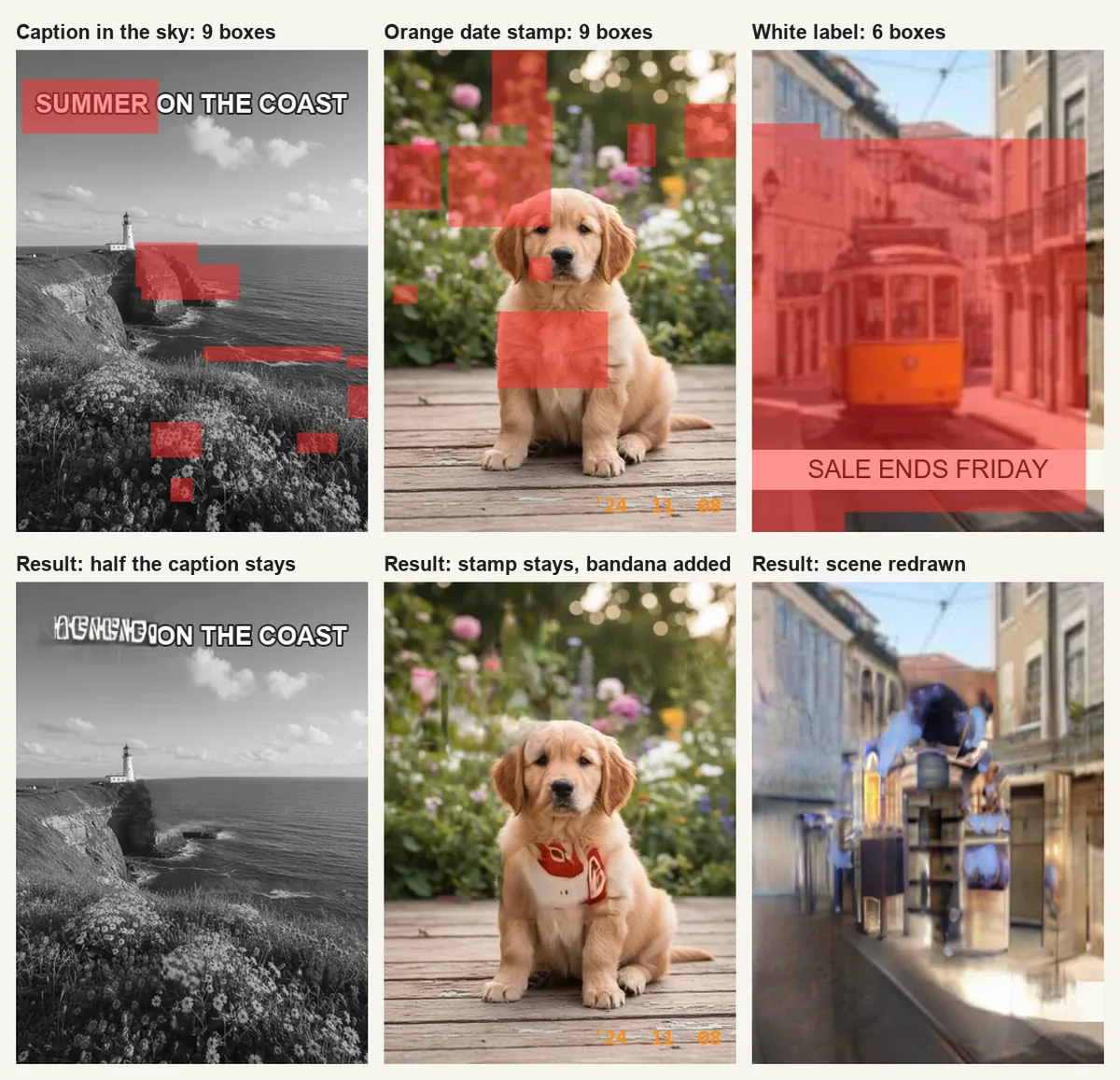
Find text runs Tesseract, an open-source OCR engine released under the Apache License 2.0 that can recognize more than 100 languages. The Text Remover loads its English model, shrinks a large picture so the longest side is at most 2,000 pixels for the search, keeps only words it reads with a confidence of 40 or more, and widens each box by a quarter of the word height. Tesseract’s own page says image quality often has to be improved for good results, and photos with text over them are not clean documents. Our results were mixed:
| Test photo | Boxes marked | What happened |
|---|---|---|
| Lighthouse coast with the caption “SUMMER ON THE COAST” | 9 | Only the word SUMMER was boxed. The other boxes sat on the cliff, the sea and the grass. Removing them left a garbled first half of the caption and the second half untouched. |
| Puppy photo with an orange date stamp | 9 | None on the stamp. Boxes on flowers and on the puppy’s chest, and removing them painted a red bandana shape on the puppy. |
| Tram street with a white label “SALE ENDS FRIDAY” | 6 | Large boxes covered most of the street. Removing them redrew the scene and the tram lost its shape. |
So the rule is: use Find text as a starting point on a clean screenshot or a document with plain, dark text on a light background, and always look at the red boxes before you press Remove. On a photo, the brush is the better first choice. A box over a face, an animal or a building makes the model invent something there.
Can you remove a date stamp or a small credit line?
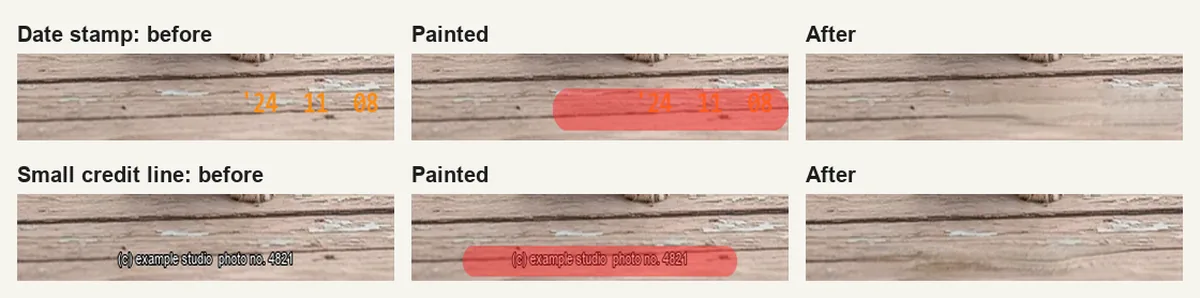
Yes, when you paint it by hand and the area around it is plain. We painted an orange date stamp and a small black credit line (“(c) example studio photo no. 4821”) on a wooden floor and removed both. The after strips show a faint smooth patch where the text was, but no letters. This is the use the tool suits best: your own camera date stamp, a timestamp in a screenshot corner, or a caption you added yourself and no longer want, over a calm surface.
Find text had missed the same kind of orange date stamp completely on the puppy photo, so this is the case where the brush is the right answer: paint a rounded band across the numbers, a little wider than the digits, and remove.
Which backgrounds work and which smear?
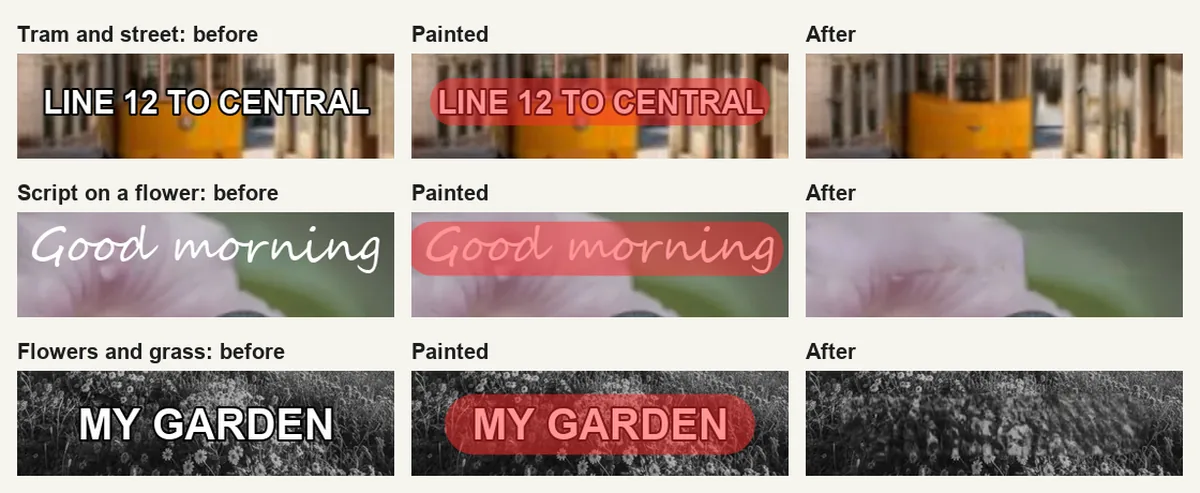
The model fills from the surrounding pixels, so the background decides the quality more than anything else. What we saw with white text:
| Background | Result | Verdict |
|---|---|---|
| Sky with soft clouds | Clean sky (brush of 34) | Good |
| Pink flower petals | Smooth petals, no trace of the script | Good |
| Wooden floor | A faint smooth patch | Good |
| Grass and small flowers | A blurrier version of the grass | Acceptable at thumbnail size, visible when zoomed |
| Tram and street, with the text over the tram | A smeared orange shape | Poor: the text sat on an object with a clear shape |
The pattern matches what the tool’s own page says: it works well on captions, date stamps, timestamps and signs over fairly simple backgrounds, and text over a detailed or patterned background leaves the model more to invent. If text crosses a face, a hand, a logo or a straight architectural line, expect a visible repair. You can try painting only the part of the text that sits on the plain area first, removing it, and repeating for the rest in a second pass.
When should you crop the text out instead?
Removing text is a repair; cropping is a deletion, and it is often cleaner. Crop when the text sits within a strip along an edge, such as a caption bar at the bottom of a screenshot or a date line in a corner, and losing that strip does not matter. Use the Image Cropper; it keeps every remaining pixel exactly as it was. Remove with the Text Remover when the text is in the middle of a picture you cannot crop without losing the subject.
If you need to remove a whole object rather than letters, such as a sign or a person you took by accident, the Object Eraser uses the same kind of fill. For scratches on an old photo, use the Photo Restorer.
Is it okay to remove text from someone else’s picture?
Only remove text from images you own or have the right to edit. Your own date stamp, a caption you added, a screenshot of your own screen and your own draft layouts are fine. Removing a watermark, a signature or a copyright notice from another person’s work is against the ImgVX terms and can infringe their rights, whatever tool does it. If you want to put your own mark on your pictures, see how to add a watermark to a photo, and to add new words, how to add text to a picture.
Which tool should you use?
| You want | Use |
|---|---|
| Words over a simple background gone, nothing uploaded | Text Remover |
| A caption strip along an edge gone | Image Cropper |
| A sign, a person or an object gone | Object Eraser |
| The words copied as editable text | Image to Text |
| Text removed from a very detailed picture with no visible repair | The original file without the text, or a desktop editor with manual cloning |
The online text removers that came up in our search (Pixelbin, Fotor, Picsart, PicWish, PxBee and others) follow the same upload, detect or brush, remove, download flow, and some limit free use; check each page’s terms. The difference here is that the picture stays on your device and there is no account or watermark. If you have the original file without the text, such as the layered design file or the unedited camera photo, use that: no tool recovers what was really under the words as well as the original does.
Troubleshooting
| What you see | Cause | Fix |
|---|---|---|
| Ghosts of the letter outlines remain | The brush did not reach the outline | Raise the Brush size and paint a margin around the text |
| Find text marked nothing | Stylised, small or low-contrast lettering | Paint it by hand |
| Find text marked things that are not text | Textures that look like letters | Press Clear painting and paint only the text |
| A new shape appeared on a person or an animal | A box covered it | Clear the painting and paint only the text |
| The area looks blurry | Busy or patterned background | Work in smaller strokes, or crop |
| The object under the text is smeared | Text crossed a shape the model cannot rebuild | Use the original file, or crop |
| It is slow the first time | The model is downloaded once | Wait for the first run; it is cached after that |
| The file is bigger than the original | The result is a PNG | Use the Image Compressor |
Questions
How do I remove text from an image for free?
Open the free Text Remover, drop in your picture, paint over the words with the brush (or press Find text and then brush over anything it missed), then press Remove painted text and download the PNG. It runs in your browser, so the picture is never uploaded, and there is no account, watermark or daily limit.
Can you remove text from a picture without Photoshop?
Yes. The Text Remover uses an inpainting model called MI-GAN to fill the painted area from the pixels around it, the same idea as a content-aware fill. It works best on text over a simple background such as sky, a wall or a plain floor.
Why does Find text miss some of the words?
Find text runs the Tesseract OCR engine with its English model and only keeps words it reads with a confidence of 40 or more. In our tests it boxed only the word SUMMER of a caption in the sky and missed an orange date stamp completely. Tesseract's own page says image quality often has to be improved for good results. Paint over anything it missed by hand.
What brush size should I use to remove text?
Use a brush wider than the letters, including their outline. The slider runs from 5 to 150 and starts at 40. On a caption in the sky a brush of 8 painted a thin line through the letters and left ghosts of the outline, while a brush of 34 covered the whole caption and left clean sky. Browse: all free image tools.
Why does the area look blurry or smeared after removing text?
The model has to invent what was under the letters. On a plain sky or floor that is easy. Over a detailed object such as a tram, it produced a smeared shape, and on a field of flowers and grass it gave a blurrier version of the texture. Paint less area, work in several small strokes, or crop the text out instead.
Is it legal to remove text or a watermark from an image?
Remove text only from images you own or have the right to edit, such as your own date stamp or a caption you added. Taking a watermark, signature or copyright notice off someone else's work is against the ImgVX terms and can infringe their rights. If you only need the words, the Image to Text tool reads them without erasing anything.
Does removing text reduce the image quality?
The Text Remover changes only the painted area and saves the result as a PNG, so the rest of the picture is not recompressed. The painted area is newly generated, so look at it at full size before you use it. Our date stamp and credit line tests came out as a faint smooth patch on a wooden floor.
Is it safe to use on a private photo or a screenshot?
Yes. Both the text detection and the fill run on your device. The tool downloads its models once, about 27 MB plus a few MB for text detection according to its own notice, but your picture is never sent to a server.