
remove.bg Is Shutting Down: What to Use Instead (2026)
remove.bg is folding into Canva, and the standalone site, its self-service API, the Photoshop plugin and the desktop app are reported to stop on December 1, 2026. Canva is the official home for its background removal from then on, but Canva’s remover is part of its paid plans. If you used remove.bg for free, or through the API, you need to choose something else. This guide sorts the replacements by how you used remove.bg, and says what to do with your account before the cutoff.
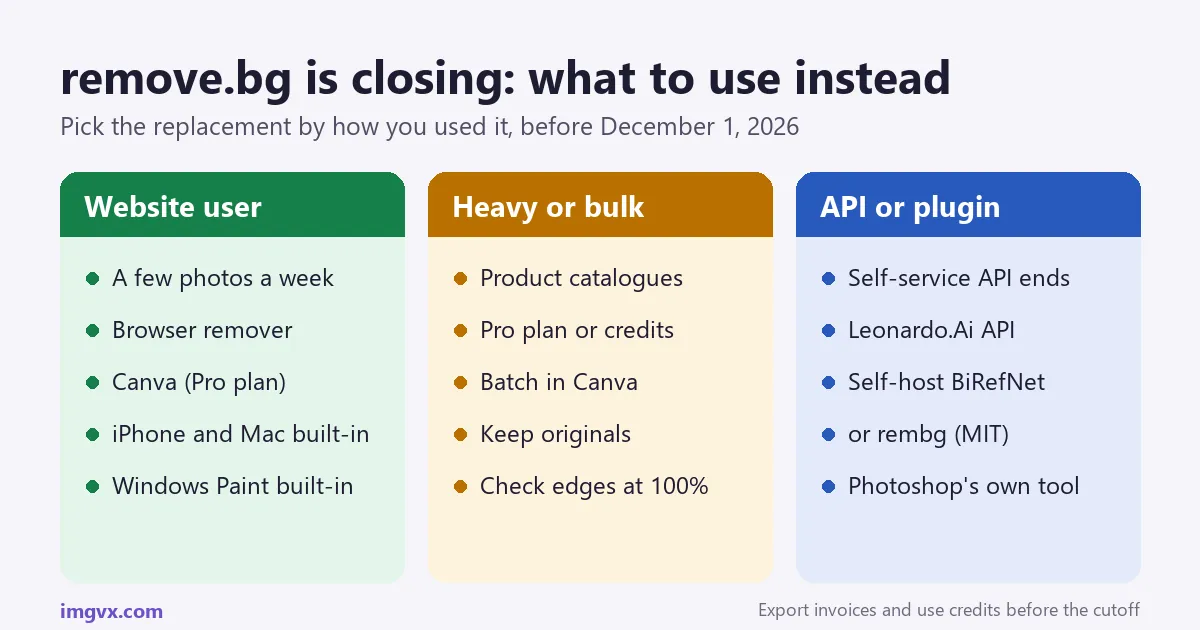
The short answer
- What is happening: remove.bg says its background removal is moving into Canva. Reports of the announcement give December 1, 2026, 9:00 CET as the end of the website, self-service API, plugins and desktop app.
- Before the cutoff: use up pay-as-you-go credits, download invoices and replace remove.bg links in your scripts and bookmarks.
- A few photos at a time: a browser background remover (free, nothing to install), or the remover built into your iPhone, Mac or Windows Paint.
- Already on Canva Pro: use Canva’s Background Remover, which runs remove.bg’s technology.
- API users: the Leonardo.Ai API is the reported official path; self-hosting BiRefNet or rembg (both MIT licensed) avoids depending on another provider.
What is changing, and when
remove.bg launched in 2018 and became the default answer to “how do I remove a background”. Canva bought it in 2021 (through its purchase of Kaleido, the company behind it). In September 2026 remove.bg announced that its background removal is moving into the Canva platform. Its FAQ now says the feature is “migrating” into Canva.
The details below come from the announcement as reported by AlternativeTo and others in September 2026. remove.bg’s own FAQ confirms the move to Canva but does not list these dates or terms, so check your account emails from remove.bg for the version that applies to you:
| Part of remove.bg | What is reported to happen on December 1, 2026 |
|---|---|
| Website (upload, edit, download) | Closes. Canva is named as the replacement. |
| Self-service API | Stops accepting requests. Users are pointed to the Leonardo.Ai API. |
| Enterprise API contracts | Continue as agreed. |
| Photoshop plugin, desktop app, other integrations | End. |
| Pay-as-you-go credits | Expire unused. |
| Monthly / annual plans | Monthly plans end; annual plans get a pro-rata refund. |
| Account data and invoices | Available only until the cutoff. |
The cutoff time, 9:00 CET, is 8:00 in London, 3:00 a.m. in New York, 1:30 p.m. in Mumbai and 1:00 p.m. in Karachi on December 1.
Five things to do before December 1
- Spend your credits. Credits are reported to expire with no refund. Run the images you know you will need, at full resolution, now.
- Download invoices. Accountants and tax offices will ask for them after the account is gone.
- Re-download anything you only kept in your remove.bg history. Save the cut-outs and, if you still have them, the originals somewhere you control.
- Find every place remove.bg is wired in. Scripts that call the API, Zapier or Make automations, Photoshop actions, e-commerce plugins, team help documents and bookmarks. Search your code and automation tools for
remove.bgandapi.remove.bg. - Pick and test a replacement on your own hard photos (see how to test one), so you are not choosing on November 30.
Choose a replacement by how you used remove.bg
“I used the free website a few times a month”
This is most remove.bg users. You need something that opens in a browser, removes the background in one click and gives you a PNG. A browser-based remover does exactly that. The ImgVX AI Background Remover runs the model on your own device, so the photo is not uploaded, and adds what remove.bg charged for: a choice of a transparent, white, colour or blurred background, and a choice of model for harder edges. You need a free account, and the free plan has a daily limit and a smaller download size; Pro removes both.
If you only need it on your phone or Mac, the remover already built into iOS, macOS and Windows Paint is free and needs no account at all.
“I already pay for Canva”
Then the simplest answer is Canva’s own Background Remover, which is where remove.bg’s technology is going. Select an image in a design and choose Edit, then BG Remover. Canva lists it as a feature of its paid plans (Pro, Teams, Education and Nonprofits). It works inside a design, so it suits people who were going to place the cut-out in a Canva graphic anyway.
“I edited product photos in bulk”
For catalogues, the cut-out is only the first step: Amazon, eBay and most marketplaces want the product on pure white at a set size. The Product Photo Studio cuts the product out and places it on white, with a shadow and margin, at marketplace size in one step, and our marketplace photo requirements guide lists each platform’s rules. For hundreds of images a month, an API with a script (below) will beat any website.
“I used the API, the Photoshop plugin or the desktop app”
These all end. Skip to replacing the API and plugins.
The alternatives compared
This table compares the options by what most people care about. Prices and plans change, so check each provider’s pricing page before paying.
| Option | Cost | Uploads your photo? | Best for | Watch out for |
|---|---|---|---|---|
| ImgVX AI Background Remover | Free account with a daily limit; full-size downloads and unlimited use with Pro or credits | No, the model runs in your browser | Occasional use, private photos, people who want white or colour backgrounds too | First run downloads the model (about 25 MB for Fast, about 110 MB for Best edges); slower on old phones |
| Canva Background Remover | Paid Canva plans | Yes, to Canva | Existing Canva users placing cut-outs in designs | Not available on Canva Free |
| iPhone / iPad (iOS 16+), Mac (macOS 13+) | Free | No | A quick sticker or cut-out from a clear photo | No control over edges, no background options, newer devices only |
| Windows 11 Paint | Free | No | Quick cut-outs on a PC | Basic edges; needs an up-to-date Windows 11 |
| Photoshop Remove Background | Adobe subscription | No (done in the app) | Former plugin users who need masks they can refine | Cost if you only need cut-outs |
| Leonardo.Ai API | Paid API | Yes | Developers who want a hosted API | New contract, new key, new response format |
| Self-hosted BiRefNet or rembg | Your server costs | No third party | High volume, privacy, no vendor lock-in | You run and update it; a GPU helps for speed |
Two more things decide the choice for many people. Watermarks: none of the options above put a watermark on the cut-out. Privacy: if the photos are of your children, your home or unreleased products, prefer the options that work on your device: a browser remover that runs locally, your phone, or your own server.
Removing a background in the browser, step by step
- Open the Background Remover on a phone or computer and sign in with Google or email.
- Drop in the photo. JPG, PNG, WebP and iPhone HEIC photos all work.
- Choose the model. Fast (MODNet) is quick and made for people. Best edges (BiRefNet lite) handles any subject, from products and pets to furniture, and keeps finer outlines.
- Press Remove background. The first run downloads the model; after that it is cached, and the next photo starts at once.
- Pick the result: transparent, white, a colour, or a blurred version of the original background.
- Download as PNG to keep the transparency. JPEG cannot store transparency, so a JPEG always lands on a solid colour.
If the edge around hair looks cut with scissors, try Best edges first. For the hardest cases (flyaway hair, fur, glass, lace, bicycle spokes) the Pro AI version sends the photo to Google’s segmentation model for a finer matte. For a graphic or logo on a flat white background you do not need AI at all: Make Background Transparent removes one colour instantly, and the Chroma Key Remover does the same for a green screen. Our guide to clean background removal edges covers fixing halos.
The free remover already on your device
If you only ever needed a quick cut-out, you may not need a website at all.
- iPhone and iPad (iOS / iPadOS 16 or later, iPhone XS / XR and newer): open the photo in Photos, touch and hold the subject until it glows, then tap Copy or Share. In the Files app, touch and hold an image and choose Quick Actions, then Remove Background. Our iPhone and Android guide has the full steps.
- Mac (macOS 13 Ventura or later): in Finder, right-click an image, choose Quick Actions, then Remove Background. In Preview on macOS 14 Sonoma or later, choose Tools, then Remove Background.
- Windows 11: open the image in Paint and choose Remove background in the Image group.
The catch is control. These pick the subject for you, give no white or colour background, and offer no second model when the edge is wrong. They are a good free first try; when the result is not good enough, use a dedicated remover.
Replacing the API and plugins
The API
remove.bg is reported to be directing self-service API users to the Leonardo.Ai API (Leonardo is also part of Canva). It is a different API with its own keys, pricing and response format, so plan for code changes, not a search-and-replace of the URL.
If you process many images, or the images are private, consider running a model yourself. Two well-known open-source options with licences that allow commercial use:
- BiRefNet (MIT licence): a high-quality segmentation model, and the one behind the “Best edges” option on ImgVX AI. It runs on a CPU but is much faster on a GPU.
- rembg (MIT licence): a Python library and command-line tool that wraps several models (including BiRefNet variants) behind one call, with an HTTP server mode that can stand in for a simple API.
Check the licence of the exact model weights you deploy, not only the library: some popular background-removal models are licensed for non-commercial use only.
The Photoshop plugin
Photoshop already does this. Select the layer, then choose Remove Background in the Properties panel (Quick Actions) or the Contextual Task Bar. Photoshop adds a layer mask rather than deleting pixels, so you can paint the edge back with a brush. For a batch, record those steps as an action and run it with File > Automate > Batch.
The desktop app
The desktop app’s main use was dropping a folder in and getting cut-outs back. For a folder of photos with a plain background, a self-hosted rembg command does the same. For a few photos at a time, the browser remover above works on Windows, Mac and Linux without installing anything.
How to test a replacement in ten minutes
Every tool looks perfect on its own demo photo. Test on yours:
- Pick five of your hardest images: one with loose hair, one with a pet, one with glass or a see-through object, one where the subject is close in colour to the background, and one typical photo.
- Run all five through each candidate.
- Look at each result at 100% size, on a dark background and on a white one. Halos show on dark; missing hair shows on white.
- Check the file: is it full resolution, PNG with transparency, and free of any watermark?
- Count the clicks and the cost for a typical month of your work.
The Image Compare tool shows two cut-outs side by side with a slider, which makes the differences on hair easy to see.
Frequently asked questions
Is remove.bg shutting down?
Yes, as a standalone service. remove.bg, owned by Canva since 2021, says on its own FAQ that its background removal is moving into the Canva platform. Coverage of the announcement, published in September 2026, gives the cutoff as December 1, 2026 at 9:00 CET for the website, the self-service API, the Photoshop plugin, the desktop app and other integrations. Enterprise API contracts are reported to continue.
When does remove.bg close?
The date reported from remove.bg's announcement is December 1, 2026 at 9:00 a.m. Central European Time. That is 8:00 GMT, 3:00 a.m. US Eastern and 1:30 p.m. in India. Do anything you need from your account, such as downloading invoices, before then. More help: ImgVX AI help docs.
What happens to my remove.bg credits and subscription?
According to the reported announcement, unused pay-as-you-go credits expire at the cutoff, monthly plans simply end, and annual subscribers receive a pro-rata refund for the unused months. Spend your credits on the images you still need, and download your invoices while the account is open.
What is the best free alternative to remove.bg?
For most people it is a background remover that runs in the browser, so there is no software to install and no per-image price. The ImgVX AI Background Remover runs the AI model on your own device, gives a transparent PNG with no watermark, and also offers a white, colour or blurred background; it needs a free account and has a daily limit on the free plan. If you already pay for Canva Pro, its remover uses the same technology as remove.bg.
Is the Canva background remover free?
Canva lists its Background Remover as a paid-plan feature (Canva Pro, Teams, Education and Nonprofits). On the free plan the button is shown, but it asks you to start a trial or upgrade. Free alternatives include browser tools such as ImgVX AI and the background removal built into iPhone, Mac and Windows Paint.
What can replace the remove.bg API?
remove.bg is reported to be pointing self-service API users to the Leonardo.Ai API. If you would rather not depend on another service, open-source models with permissive licences can run on your own server: BiRefNet (MIT licence) for the best edges, and the rembg library (MIT) as a simple wrapper around several models. Test any replacement on 50 to 100 of your own images before switching, because edge quality varies by subject.
What can replace the remove.bg Photoshop plugin?
Photoshop has its own one-click background removal: select the layer and choose Remove Background in the Properties panel or the Contextual Task Bar, which adds a layer mask you can refine. Affinity and GIMP have their own selection tools, and the GIMP route is described in remove.bg's own article on the subject.
Can I remove a background without uploading the photo?
Yes. The ImgVX AI Background Remover downloads the AI model to your browser once and then processes the photo on your device, so the image is not sent to a server. The background removal built into iPhone (iOS 16 and later), macOS and Windows Paint also works on the device.
Does remove.bg still work right now?
Until the reported cutoff on December 1, 2026, yes. After that date the remove.bg address is expected to point visitors to Canva. If you have saved remove.bg links in bookmarks, scripts or help documents, replace them before then. Browse: all free image tools.
Why do remove.bg alternatives give different results on hair?
Each one uses a different segmentation model, and hair is where models differ most, because single strands are thinner than a pixel at the edge. Larger models keep more of the fine outline; smaller, faster ones clip flyaways or leave a halo. Try two tools on your hardest photo before choosing, and look at the edges at full size, not as a thumbnail.
Remove a background now
Transparent, white or any colour, in your browser. The photo stays on your device.