
How to Remove the Background From a Photo on iPhone (and Android)
To remove the background from a photo on an iPhone, open it in Photos, touch and hold the subject until it glows, then tap Copy or Share. It is free, built into iOS 16 and later, and works on the iPhone XS / XR and newer. What it cannot do is give you a white or coloured background, let you choose a better model when the edge is wrong, or work on older phones. For those, a background remover in Safari or Chrome does the job without installing anything. Here are both, plus Samsung and other Android phones.
The short answer
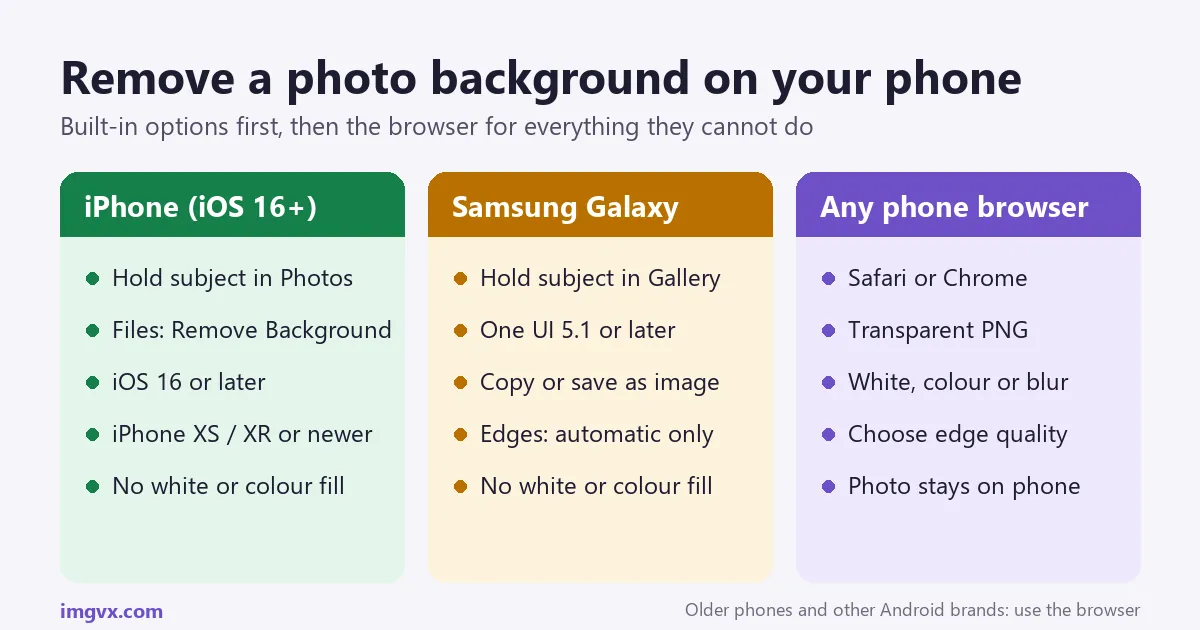
- iPhone, fastest: Photos → touch and hold the subject → Copy or Share. iOS 16+, iPhone XS / XR or newer.
- iPhone, saved as a file: Files → touch and hold the image → Quick Actions → Remove Background. A transparent PNG is saved next to it.
- Samsung Galaxy: Gallery → touch and hold the subject → Save as image. One UI 5.1 or later.
- White or colour background, product photos, older phones, other Android brands: the Background Remover in your phone’s browser.
- Keep it as PNG. JPEG cannot hold transparency.
iPhone: lift the subject in Photos
Apple added this in iOS 16. The iPhone finds the main subject with an on-device model, so nothing is uploaded.
- Open the photo in the Photos app. Photos of people, pets, products and objects work best; landscapes have no subject to lift.
- Touch and hold the subject for about a second. A glowing outline runs around it and a small menu appears.
- Tap Copy to paste the cut-out into Messages, Notes, Mail, Keynote or another app, or tap Share to send it or tap Save Image.
Two more ways to do it from Photos: touch and hold, then drag the subject out with one finger while you switch apps with another, and drop it straight into a message or note. And on iOS 17 or later, Add Sticker in the same menu turns it into a sticker for the emoji keyboard and Messages.
The same touch-and-hold also works on images in Safari, in screenshots, and in Quick Look previews, which is handy for a product image on a website.
Which iPhones can do it
It needs iOS 16 or later and an iPhone with an A12 Bionic chip or newer: the iPhone XS, XS Max and XR, and every model since, including the iPhone SE (2nd generation and later). It does not work on the iPhone X, iPhone 8 or older. On iPad it needs iPadOS 16 and a similarly recent chip.
iPhone: save a transparent PNG with the Files app
When you want a file rather than something on the clipboard, for example to upload to a website, Files is cleaner:
- Save the photo to Files: in Photos, tap Share, then Save to Files.
- Open the Files app and find the image.
- Touch and hold it, then choose Quick Actions → Remove Background.
- A new PNG with a transparent background is saved next to the original.
Why does the saved image look like it has a white background? Photos displays transparent images on a plain background. The transparency is still there: paste the image onto a coloured background in another app and the background disappears.
Samsung and other Android phones
Samsung Galaxy
Samsung added the same idea to its Gallery app with One UI 5.1, which arrived with the Galaxy S23 and was updated to many recent Galaxy phones and tablets.
- Open the photo in Gallery.
- Touch and hold the subject until an outline appears.
- Choose Copy, Share or Save as image. Saving creates a PNG with a transparent background.
If nothing happens, check Settings → About phone → Software information for the One UI version, and update the Gallery app from the Galaxy Store.
Pixel and other Android phones
Background removal on other Android phones depends on the maker and the version, and many have no built-in way to save a transparent cut-out. The dependable route on any Android phone is a background remover in Chrome, described below. It also works the same way on a Chromebook or a computer, so you only learn one tool.
What the built-in tools cannot do
The built-in tools are made for quick stickers and cut-outs. They fall short when:
- You need a white background. Marketplaces such as Amazon, eBay and Etsy, and many ID and job forms, want a white or plain background, not a transparent one. The phone only gives transparency.
- It picks the wrong subject. In a photo of a person holding a dog, it decides what the subject is. You cannot ask for just the dog.
- The edge is wrong. There is one model and no setting. If it clips hair or leaves a bit of background, you cannot try again with a better one.
- Your phone is too old, or it is an Android phone without the feature.
- You want a blurred background rather than none, for a portrait-mode look on a photo taken without it.
Remove a background in Safari or Chrome
The ImgVX AI Background Remover runs in the phone’s browser, with nothing to install. The AI model is downloaded to the phone and runs there, so the photo is not uploaded.
- Open imgvx.com/background-remover in Safari or Chrome and sign in with Google or email (a free account is required).
- Tap to choose a photo from your library, or take one with the camera.
- Choose a model. Fast (about 25 MB) is made for people and is quick on any phone. Best edges (about 110 MB) handles products, pets and furniture and keeps finer outlines. Use Wi-Fi for the first download; after that the model is cached.
- Tap Remove background, then pick Transparent, White, a colour or Blur.
- Download. On iPhone the file goes to Downloads in the Files app; tap Share, then Save Image to put it in Photos. On Android it goes to the Downloads folder and appears in Gallery or Google Photos.
On older phones, the Best edges model can take a while on a large photo. If it is slow, use Fast, or resize the photo to about 2000 pixels on the long side first with the Image Resizer. The free plan has a daily limit and saves the result at a reduced size; Pro gives full-resolution downloads and unlimited use.
For many photos and finer control, the Studio is the full editor in the same browser tab, sized for a phone screen.
Five common jobs, and the quickest way to do each
| Job | Quickest way on a phone |
|---|---|
| A sticker for Messages or WhatsApp | iPhone Photos: touch and hold, Add Sticker (iOS 17+). For WhatsApp or printing, the AI Sticker Maker adds a white outline. |
| A product photo on white for Amazon, eBay, Etsy or Shopify | The Product Photo Studio: cut-out, pure white background, shadow and margin, at marketplace size. See the marketplace photo rules. |
| A profile picture with a clean background | Remove the background and choose a colour, or soften it with Portrait Blur, then crop to a circle with the Avatar Maker. |
| A passport or visa photo | The Passport Photo Maker puts the face on white and frames it at the official size. Our passport photo guide covers the rules. |
| A new background (a beach, an office, a plain studio) | The Background Replacer cuts out the subject and places it on a new background in one step. |
For a signature or a logo on white paper, you do not need AI at all: the Signature Extractor and Make Background Transparent remove the paper or a flat colour instantly.
Getting cleaner edges
- Shoot for the cut-out. Stand the subject a step away from a plain wall, in even light. A subject that contrasts with the background (dark shirt, light wall) cuts out cleanly with any tool.
- Avoid Portrait mode for cut-outs. Its artificial blur softens the edge the remover needs to find. Use the normal Photo mode.
- Use the main 1× camera, not the ultra-wide, which is softer at the edges of the frame.
- Check at full size. Zoom into the hair and the edges before you post. Halos show up against dark colours, missing hair against white.
- For the hardest photos (loose hair, fur, glass, lace), the Pro AI background remover uses a larger cloud model. Our guide to clean background removal edges explains how to fix the rest.
Used remove.bg on your phone? It is shutting down on December 1, 2026; our guide to remove.bg alternatives covers what to switch to.
Frequently asked questions
How do I remove the background from a photo on my iPhone for free?
Open the photo in the Photos app, touch and hold the main subject until a glowing outline appears, then tap Copy to paste it into another app, or Share to save or send it. This needs iOS 16 or later on an iPhone XS, XR or newer. For a white or coloured background instead of a transparent one, use a browser tool such as the ImgVX AI Background Remover in Safari.
Why can't I lift the subject from my photo on iPhone?
The most common reasons: the iPhone is older than the XS / XR (the feature needs an A12 chip or newer), it is not on iOS 16 or later, the photo has no clear subject (a landscape, or a group with nobody standing out), or you are pressing too briefly. Touch and hold for about a second on the person, pet or object, not on the background.
How do I save an iPhone cut-out as a PNG with a transparent background?
After touching and holding the subject, tap Share, then Save Image. Photos keeps the cut-out as a PNG with transparency, even though the Photos app shows it on a plain background. Another way: in the Files app, touch and hold the image, choose Quick Actions, then Remove Background, and a new PNG is saved next to the original.
How do I put a white background on an iPhone photo?
The built-in iPhone tool only gives a transparent cut-out. Open the ImgVX AI Background Remover in Safari, choose the photo, remove the background and pick White, then download. For product photos for Amazon or eBay, the Product Photo Studio places the item on pure white at marketplace size.
How do I remove the background from a photo on Samsung?
On a Galaxy phone with One UI 5.1 or later, open the photo in Gallery and touch and hold the subject until it is outlined, then choose Copy, Share or Save as image. On Android phones from other makers, or older Galaxy phones, use a browser background remover in Chrome.
Can I remove a background on my phone without an app?
Yes. The iPhone feature is built into iOS, and the ImgVX AI Background Remover works in Safari or Chrome on any recent phone, with nothing to install. You need a free account; the photo itself is processed on the phone rather than uploaded.
Why do the edges around hair look rough?
Hair strands are thinner than a pixel at the edge, so every automatic tool has to guess. The iPhone tool is tuned for speed and clean stickers, not fine hair. In the ImgVX AI Background Remover, choose Best edges for a finer outline, and for flyaway hair or fur try the Pro AI version, which uses a larger model.
Does removing a background reduce photo quality?
It should not change the subject itself, but the format matters. Save as PNG to keep transparency at full quality. Saving as JPEG puts the cut-out on a solid colour and adds compression. Some free tools also shrink the image; check the size of the download before using it for print.
How do I make an iPhone sticker from a photo?
On iOS 17 or later, touch and hold the subject in Photos and tap Add Sticker. The sticker appears in the emoji keyboard and in Messages, and you can add effects such as Outline or Shiny. To make a sticker to print or share elsewhere, the AI Sticker Maker adds a white border and saves it as a PNG.
Is it safe to remove a background from a private photo online?
It depends on the tool. Many online removers upload the photo to their servers. The iPhone feature works on the phone, and the ImgVX AI Background Remover runs its model in your browser, so the photo is not uploaded. Check a tool's privacy page before using it for photos of children or documents.
Remove a background on your phone
Transparent, white, colour or blur, in Safari or Chrome. The photo stays on your phone.