
How to Split an Image Into Equal Parts Online (Free)
To split an image into equal parts, choose how many columns and rows you want, and cut along that grid. Two columns and two rows give four pieces; three of each give nine. The free Image Splitter does this in your browser and downloads every tile in one ZIP, numbered in reading order. There is no sign-up, and your image is never uploaded.
The short answer
- Tool: Image Splitter. No AI model, and no watermark.
- Grid: 1 to 12 columns and 1 to 12 rows, so up to 144 tiles.
- Formats: JPG by default, or PNG and WebP.
- Watch for: Instagram mosaics go up in reverse order, from the last tile to the first.
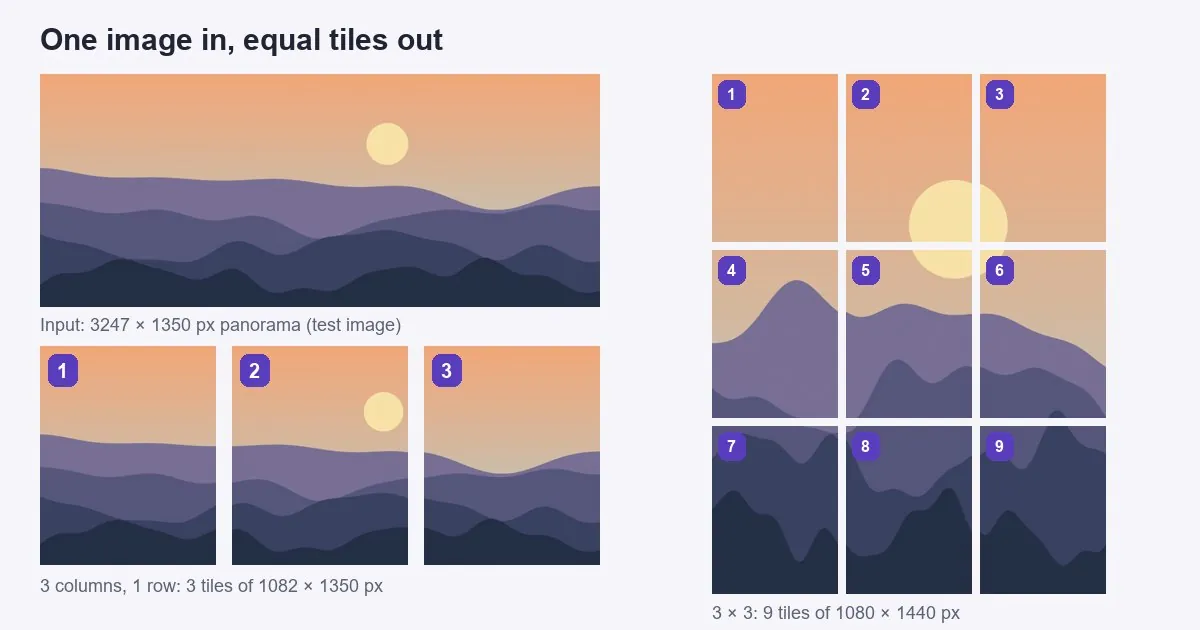
How to split an image in four steps
- Open the tool and add the image. Open the Image Splitter and drop in your file.
- Set Columns and Rows. Columns cut the image from top to bottom, and rows cut it from side to side.
- Choose a format under Save as. Use PNG for a transparent image or a screenshot with text, and JPG for a photo.
- Download. Save the tiles one at a time, or use Download all as ZIP. Each name ends in its number, such as
photo-01.jpg.
Which rows and columns to use
| You want | Columns | Rows | Tiles |
|---|---|---|---|
| Left and right halves | 2 | 1 | 2 |
| Top and bottom halves | 1 | 2 | 2 |
| Four equal pieces | 2 | 2 | 4 |
| Swipeable panorama of three slides | 3 | 1 | 3 |
| Instagram profile mosaic | 3 | 3 | 9 |
| Simple jigsaw or classroom puzzle | 4 | 4 | 16 |
The halves, four pieces and Instagram grid are one click away as presets: in half, in four and Instagram grid.
How big each tile will be
Divide the width by the columns and the height by the rows, and round down. That rounding is the one thing to know. Every tile comes out exactly the same size, so any spare pixels at the right and bottom edges are dropped.
We ran a 3247 × 1350 px test image through the tool with 3 columns. The tiles came out at 1082 × 1350 px, which adds up to 3246, so one column of pixels was lost. That is invisible on a photo. If the edge matters, for instance on a chart with a border, first make the width divide evenly with the Image Resizer or the Image Cropper.
The format changes the file size far more than the grid does. These are the same three tiles, saved each way:
| Format | Size of the ZIP | Transparency | Use it for |
|---|---|---|---|
| JPG | 323.5 KB | No | Photos for social media |
| WebP | 95.3 KB | Yes | Websites |
| PNG | 3.46 MB | Yes | Print, text, logos and further editing |
Your numbers will differ, since this was a synthetic test image, but the order is typical.
How to split an image for Instagram
Instagram gets two different kinds of split, and they need different shapes.
A swipeable panorama (carousel)
Use 3 columns and 1 row. For slides in the safe 4:5 portrait shape of 1080 × 1350 px, the image needs to be 3240 × 1350 px. For square slides, make it 3240 × 1080 px. Anything else is cropped or scaled to fit. If your panorama is a different shape, cut it to that first with the Image Cropper. Post the tiles in order, 1, 2, 3, in a single post, since the carousel keeps the order you pick. Very wide photos can run to more slides, and Instagram's limit is reported as 20.
A mosaic across the profile
Use 3 columns and 3 rows, and post each tile on its own.
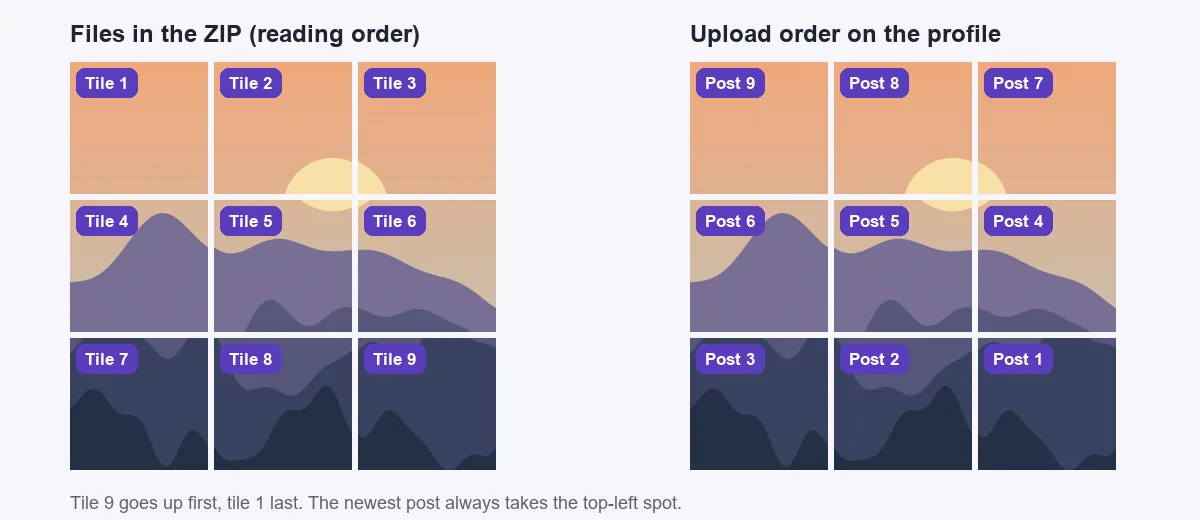
The order catches people out. The newest post always takes the top-left spot, so upload tile 9 first and tile 1 last. Posting row by row, as 7, 8, 9, would leave every row mirrored. Upload the nine in one sitting, because each later post pushes the whole mosaic along. It only stays lined up while the number of posts added on top is a multiple of three, and pinned posts also shift it.
The shape is harder. Since early 2025 the profile grid has cut thumbnails to 3:4, while the documented limit for a feed post is still 4:5, and sources disagree on whether a 3:4 post is now accepted. So no shape is guaranteed to work both ways:
| Image to split | Tile | In the grid |
|---|---|---|
| 3240 × 4320 px | 1080 × 1440 px (3:4) | Lines up, if your app does not trim the post to 4:5 |
| 3240 × 4050 px | 1080 × 1350 px (4:5) | About 34 px is lost from each side of every tile, so the seams jump a little |
Our advice is to use the 3:4 tiles and check the crop screen on the first one before posting the rest. A soft picture such as a landscape hides small seams well, while straight lines and text show them. For a single photo that just needs to fit, you don't need a split at all: see how to post a full picture on Instagram without cropping.
How to print a large image across several sheets
A grid of ordinary sheets makes a poster that a home printer could never handle. Two things decide how it turns out.
Resolution. Each sheet needs enough pixels. We split a 4960 × 7016 px test image, which is A2 at 300 DPI, into A4 pages. A4 portrait is 8.27 inches wide:
| Grid | Poster size | Tile size | Sharpness on A4 |
|---|---|---|---|
| 2 × 2 | 42 × 59 cm | 2480 × 3508 px | 300 DPI |
| 3 × 3 | 63 × 89 cm | 1653 × 2338 px | 200 DPI |
| 12 × 12 | 2.5 × 3.6 m | 413 × 584 px | 50 DPI |
A poster is seen from further away than a photo, so it can stand a lower figure, but check your own image first with our DPI guide. If you are short of pixels, the Image Upscaler can add some before you split.
Margins. Most home printers cannot print to the edge of the paper. The tool adds no overlap, so a tile printed at 100% loses a thin strip on every side, and one scaled to fit leaves a white border to trim. Either way, print one sheet as a test and measure it. Then trim the borders and join the sheets from the back with tape.
If you need a glue overlap, turn the image into a PDF with Image to PDF and use the Poster option in Adobe Acrobat Reader's print window. That lets you set the overlap, and it works out the sheets for you. To make a smaller file first, the Image Compressor helps, though print quality matters more here.
When to use a different tool
| You want | Use |
|---|---|
| One piece of any size | Image Cropper |
| To join images rather than split one | Combine Images or the Photo Collage Maker |
| To join overlapping photos into a wide view | Panorama Stitcher |
| The frames of a GIF as separate images | GIF Frame Extractor |
The Image Splitter also works on a sprite sheet with evenly spaced cells and no padding, up to 12 columns and 12 rows. To go the other way, see our guide to sprite sheets.
Frequently asked questions
How do I split an image into equal parts for free?
Open the free Image Splitter, drop in the image, set the Columns and Rows, and download the tiles as one ZIP. There is no sign-up and no watermark, and the image stays on your device.
How do I cut a picture into 4 equal pieces?
Set 2 columns and 2 rows, or use the Split into four preset. For four strips instead, use 4 columns and 1 row, or 1 column and 4 rows.
How do I split an image in half?
For a left half and a right half, set 2 columns and 1 row. For a top half and a bottom half, set 1 column and 2 rows. More help: ImgVX AI help docs.
In what order do I post a 3 × 3 grid on Instagram?
Post tile 9 first, then 8, 7 and so on, with tile 1 last. The newest post takes the top-left spot on a profile, so posting in reading order would give you the picture backwards. Browse: all free image tools.
Does splitting an image lose quality?
The tiles are not scaled, so each one keeps the original pixels. Saving as PNG loses nothing. JPG and WebP compress each tile again, which is usually invisible but makes a difference if you plan to edit the tiles further.
Can I split an image into unequal parts?
Not with the Image Splitter, which only cuts an even grid. For a piece of any size, use the Image Cropper once for each piece.
Sources: grid limits, rounding and numbering checked against the Image Splitter's code on 2 November 2026; sizes and file sizes come from the live tool, run on synthetic test images. Poster sizes and DPI are worked out from ISO 216 A4 paper (210 × 297 mm). The move to a 3:4 profile grid: Adam Mosseri's statement as reported by Engadget and the Philippine Daily Inquirer, January 2025. The Poster option: Adobe Help, Print posters and banners using Acrobat. Instagram's 20-slide limit comes from third-party guides quoting its Help Center, which we could not open directly.
Split your image now
Free, in your browser, with no sign-up and no watermark.